Redos & Swaps: Perfect & Fine-Tune Your AutoReel Videos with Ease (2026)

Summarize with AI


Because even the best videos deserve a second take. AutoReel's AI takes your listing photos and transforms them into stunning videos — optimised for MLS, Facebook, Instagram, TikTok, and YouTube — all in just minutes. Now with Redos & Swaps, you have even more control to perfect each clip.
Meet Redos & Swaps — More Ways to Fine-Tune Your Videos
Edits allows users to retain their originally generated clips while modifying the intro or outro text, music, or branding images. Now with Redos and Swaps, you can generate new clips for a few scenes that need re-tweaking by the AI engine.
Re-generate a clip with AI to resolve hallucinations or improve visual quality. One click, that specific scene only — the rest stays intact.
Completely swap out the image powering a clip, then re-generate it with AI. Total creative control when the original photo itself is the issue.
Whether it's a small visual hiccup or just a different look you're after, you now have two powerful ways to update any clip — without touching the rest of the video.
See It In Action
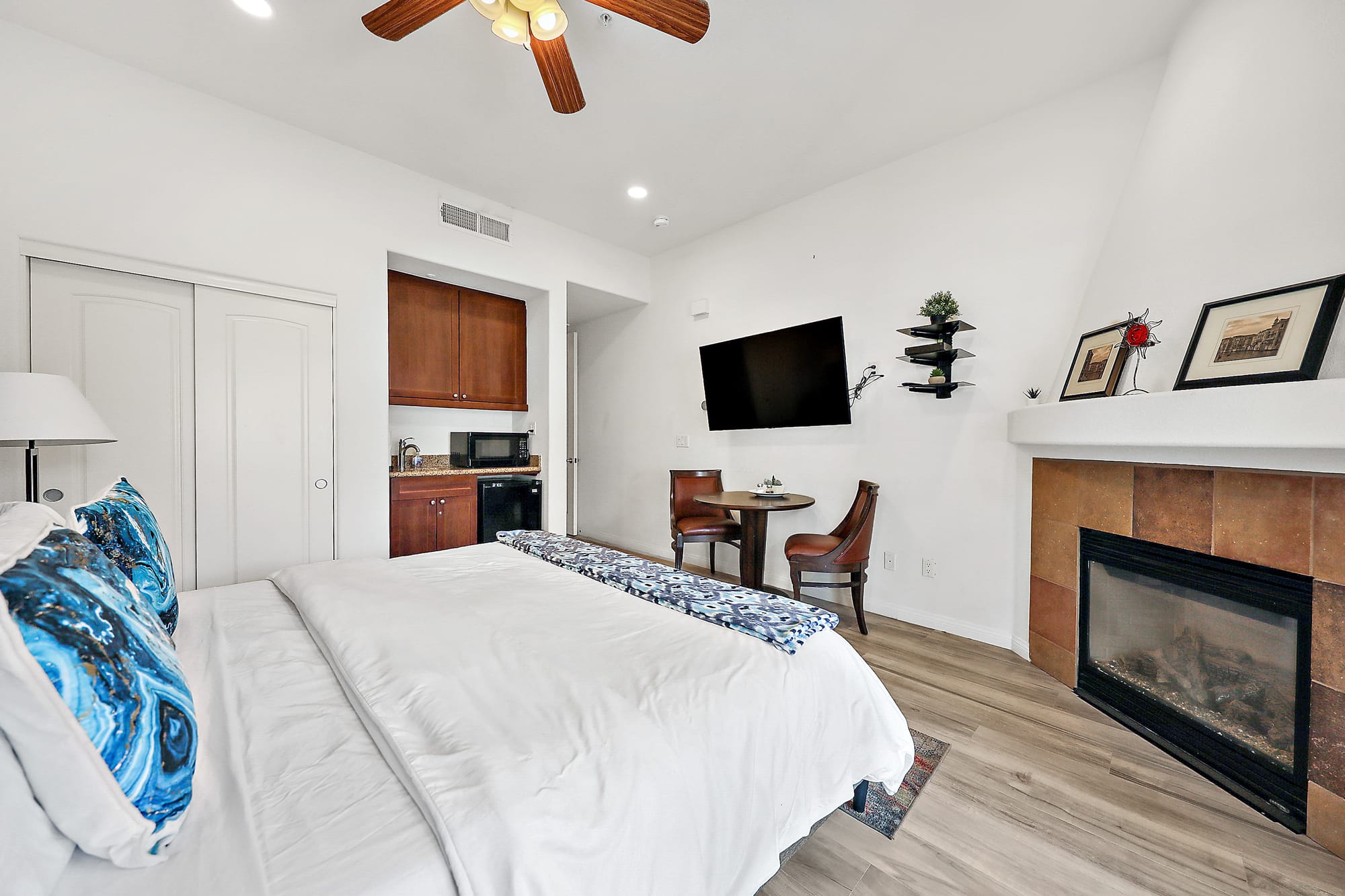
Original listing photo of a bedroom.
Original clip generated by AutoReel shows a ceiling fan where it's not supposed to be — a classic AI hallucination.
Updated clip with Redo applied — the ceiling fan hallucination is gone and the room looks clean and accurate.
Why We Built Redos & Swaps
When we introduced AutoReel's Edit feature, users loved the ability to remove scenes, re-order clips, change music, and customise branding. However, Edit does not allow you to redo any individual clip. But we kept hearing one request:
"I love my video, but there's just one or two clips that don't look quite right. I don't want to redo the whole thing. Can I just fix those?"
Redos solved this by letting you regenerate a clip with one click. But sometimes, the issue isn't a hallucination — it's the original photo itself. That's where Swaps come in. Now, you can go beyond Redo and completely swap in a different photo to re-generate the clip, giving you total control without losing the time-saving power of AI.
How Redos & Swaps Work
Watch the full video guide below for a tutorial, or follow the step-by-step guide underneath.
Full tutorial — Redos & Swaps in AutoReel.
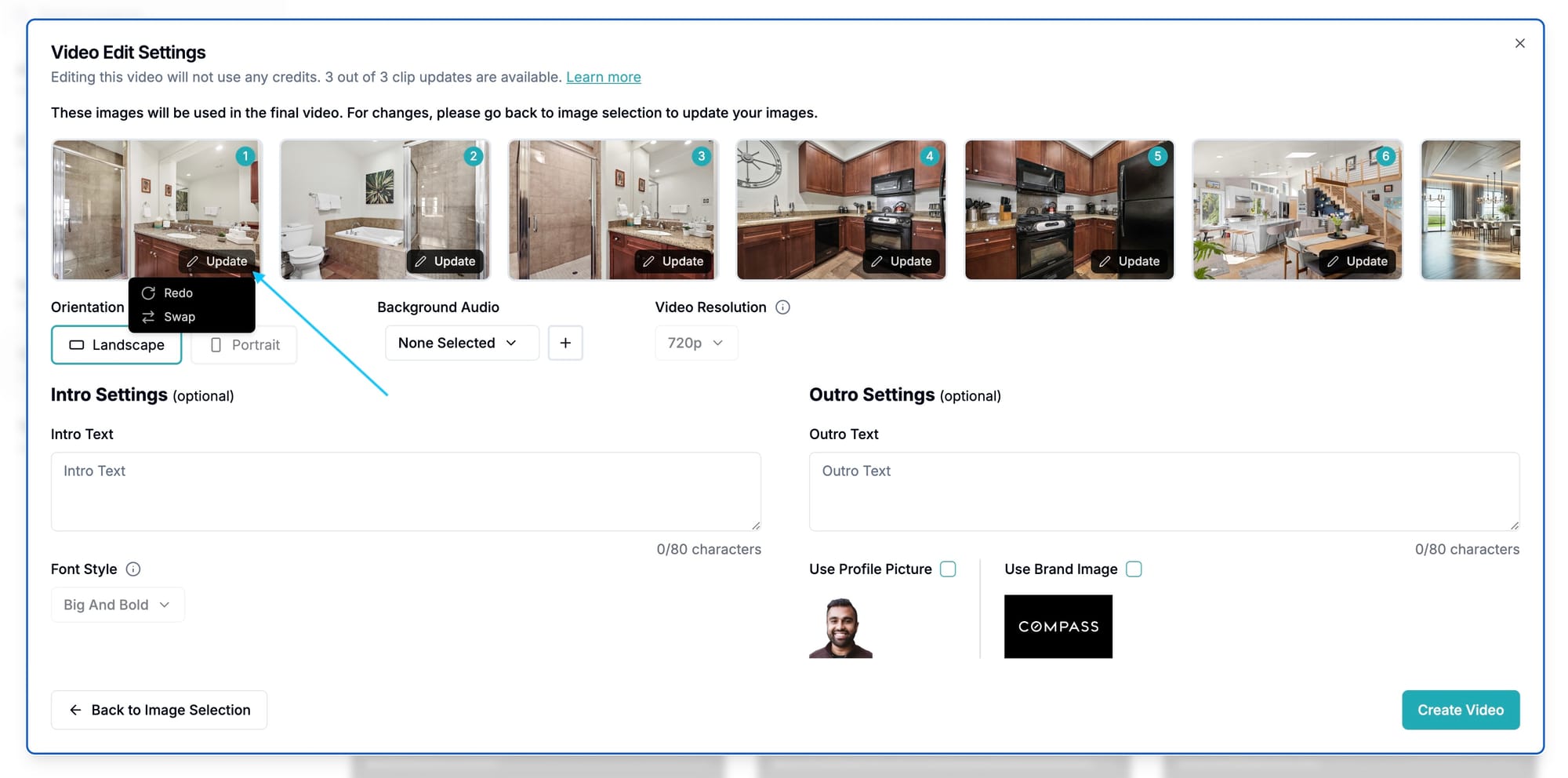
Redo or Swap individual clips within the Edit flow.
Editing your video is still as easy as ever. Now you have one more powerful tool at your disposal.
📌 Step 01: Edit Your Video
Once your video is generated, head to the Edit workflow where you can remove scenes, re-order clips, adjust music, text, and branding.
📌 Step 02: Redo or Swap on Individual Clip(s)
If you notice a scene that could be better, go to the image, click Update, and select Redo or Swap. The AI engine will re-generate that specific scene while keeping the rest of your video intact.
📌 Step 03: Review & Share
Like the new version? You can begin sharing this revision immediately. Still not perfect? Depending on your plan, you have additional redos available.
Who Gets Access and How Many?
We want to ensure all AutoReel users get the best results possible. AI computing is resource-intensive, so we've balanced flexibility with fair usage across plans:
Why This Matters
AutoReel's AI is powerful, fast, and evolving. While AI-generated media has made incredible strides, minor variations can sometimes happen — just like any creative process. But here's the exciting part: Redos and Swaps ensure that you're always in control.
And the best part? Redos and Swaps are free for all paid plans on AutoReel.
Ready to try Redos & Swaps?
If you've ever wished you could tweak just one or two clips instead of starting over, Redos and Swaps are your new best friend.
"Groundbreaking tool. They are committed to improving the services with new updates often."
Kim Lindsey
Owner, Kim Lindsey Photography
"An absolute game-changer! Professional-quality reels in minutes. Customer service is top-notch, quick and responsive."
Joe Semkow
Photographer, Inspire Kindness
"AutoReel transforms photos into beautiful, realistic video walkthroughs. A must-have tool for realtors in a digital-first world."
Nicole Causey
Co-Founder, Everhome Realty
"It literally takes 5 minutes on the backend to produce a great product. The cost is affordable and the developers are quick to respond."
Chris Lawrence
Owner, Rip City Photography, LLC