Top 10 Real Estate Video Makers for Fast, Easy, and Professional Editing (2026)

Summarize with AI


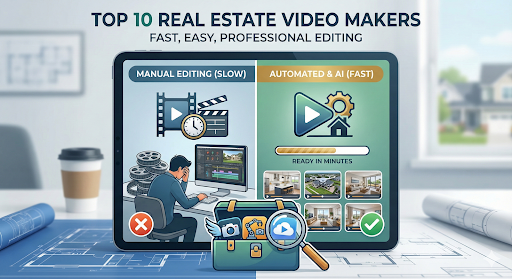
A real estate video maker has become essential for agents who need speed, consistency, and professional-looking listings.
This guide reviews the top real estate video makers designed to simplify editing, reduce production time, and help agents produce polished real estate marketing videos without relying on complex software or costly videographers.
What Is a Real Estate Video Maker?
A real estate video maker is a tool that turns property photos, short clips, or listing details into professional marketing videos.
- Traditional video editing is manual and time-consuming, often taking hours per property listing.
- Real estate video makers use automation, templates, and AI to speed up video creation.
The move toward automation is not about cutting corners. It is about producing consistent, social-ready videos in minutes rather than days, which explains why many agents are replacing outsourced video work with software-based solutions.
What to Look for in a Real Estate Video Maker Tool
Not all video makers are built for real estate.
Many are designed for general marketing and require extra adjustments. The best AI real estate video tools simplify workflows, allowing agents to quickly generate consistent, professional listing videos without manual editing.
Key criteria
- Speed: Ability to create a listing video in under 15 minutes
- Automation: Handles sequencing, pacing, and transitions automatically
- Templates: Designed specifically for property listings, not generic promotions
- Output formats: Supports vertical, square, and horizontal videos
- Learning curve: Simple enough for non-editors to use confidently
Tools that meet these criteria let agents focus on selling, not software. The best AI real estate video editors remove decisions, making video creation feel more like generating than editing.
Compare tools based on speed, automation, and ease of use before choosing one.
Top 10 Real Estate Video Makers for Fast, Easy Editing
Choosing the right real estate video maker depends on speed, ease of use, and how well the tool fits daily listing pipelines. Below are 10 platforms agents and photographers commonly use to create real estate marketing videos without complex editing.
1. AutoReel
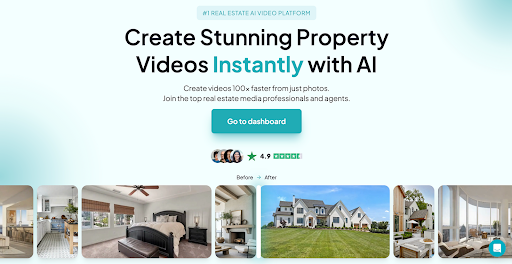
AutoReel is built specifically for real estate listings, turning property photos into short, social-ready videos in minutes. The platform focuses on automated sequencing, pacing, and transitions, removing manual editing entirely.
It converts listing photos into short, social-ready videos in 10–15 minutes, with most outputs optimized at 30 seconds.
Why agents use it:
- No editing timeline
- Consistent, professional look
- Designed for resale by photographers
According to verified data, AutoReel has already created 85,000 AI real estate videos. Photographers often resell these videos for $80–$300, while AutoReel can cost as little as $10 per video.
“Clients can’t tell the difference between AutoReel and real video unless I tell them.” — AutoReel Advocate
2. Animoto
Animoto offers drag-and-drop video creation with simple templates suitable for basic listing videos. Users manually arrange photos, text, and music, making it approachable for first-time video creators.
The tool is easy to learn but requires hands-on setup for every video.
Best for:
- Beginners experimenting with video
- Simple slideshow-style listings
- Quick promotional clips
Limitations:
- Limited real estate-specific automation
- Repetitive manual work for multiple listings
Animoto works for simple needs but lacks the automation required for high-volume real estate pipelines.
3. InVideo
InVideo provides a large template library with customization options for marketing-focused videos. It supports branding and flexible layouts, making it popular with agencies and marketing teams.
However, videos require manual configuration before export.
Best for:
- Branded real estate marketing videos
- Teams with design resources
- Custom promotional content
Limitations:
- Steeper learning curve
- Slower turnaround for listings
InVideo suits marketing-heavy teams but may slow agents who need rapid listing video production.
4. VEED.io
VEED.io is a browser-based editor emphasizing captions, resizing, and social formats. It works well for adapting existing videos but less for automated listing creation.
Editing is manual, though the interface remains clean and modern.
Best for:
- Captioned social videos
- Short-form content repurposing
- Browser-based editing
Limitations:
- Limited automation
- Not listing-focused
VEED.io is useful for social edits but isn’t optimized for fast, repeatable real estate video creation.
5. Canva Video
Canva Video extends Canva’s design tools into basic video creation. Agents familiar with Canva can quickly assemble listing videos using templates and brand kits.
Most sequencing and timing decisions remain manual.
Best for:
- Canva users
- Brand-consistent marketing
- Simple listing videos
Limitations:
- Manual photo sequencing
- Limited real estate automation
Canva Video is accessible but better suited for design-led marketing than efficient listing video pipelines.
6. Kapwing
Kapwing focuses on collaborative video editing and resizing video formats. It’s often used by teams repurposing content across platforms rather than creating listing videos from scratch.
Manual editing remains central to the experience.
Best for:
- Team collaboration
- Content resizing
- Repurposing existing videos
Limitations:
- Time-intensive for listings
- No real estate-specific features
Kapwing supports collaboration but isn’t optimized for fast, photo-based real estate video production.
7. Magisto
Magisto uses AI to automatically assemble videos from uploaded content. It reduces editing effort but offers limited control over pacing and visual structure.
Results can vary depending on photo quality.
Best for:
- Hands-off video creation
- Simple automated edits
- Casual marketing use
Limitations:
- Inconsistent output
- Limited customization
Magisto offers automation, but limited control makes it less reliable for professional real estate listings.
8. Wave.video
Wave.video combines templates, stock footage, and basic editing tools. It’s geared toward promotional marketing rather than property-specific storytelling.
Users must manually adapt templates for listings.
Best for:
- Promotional agent videos
- Brand storytelling
- Social ads
Limitations:
- Not listing-focused
- Manual setup required
Wave.video works well for branding but is inefficient for frequent real estate listing videos.
9. FlexClip
FlexClip provides lightweight editing with beginner-friendly templates. It’s suitable for quick edits but requires manual sequencing for each property.
The platform keeps things simple but limited.
Best for:
- Quick video creation
- Basic property showcases
- Low learning curve
Limitations:
- Minimal automation
- Limited scalability
FlexClip is suitable for occasional use but doesn’t scale well for agents handling multiple listings.
10. Promo.com
Promo.com emphasizes high-quality marketing videos with polished visuals. It’s commonly used for commercial promotions rather than everyday listings.
Pricing and complexity can be excessive for routine real estate needs.
Best for:
- Premium marketing campaigns
- Brand-heavy promotions
- Commercial content
Limitations:
- Expensive for volume
- Overkill for listings
Promo.com delivers visual polish but isn’t practical for fast, cost-effective real estate video production.
Explore which real estate video maker best fits your listing volume and pipeline.
Automated Video Creation vs Manual Editing — What Works Better?
Manual video editing gives agents greater creative control, but it demands significant time investment. Managing timelines, transitions, and revisions often makes video a slow, inconsistent part of the listing pipeline.
Automated video creation changes that equation. By automatically handling sequencing, pacing, and formatting, it allows agents and photographers to produce professional-looking videos quickly while keeping results consistent across listings.
Manual Editing vs Automated Video Creation Comparison
For agents handling multiple listings, automation is the more practical option. Photographers using AutoReel often add $80 to their average order value, with most of it remaining pure profit.
Automation does not replace creativity. It simply removes friction so video fits naturally into daily pipelines.
Match your pipeline needs with a tool designed for speed and consistency.
Choosing the Right Real Estate Video Maker for Your Workflow
The right real estate video maker is the one that seamlessly fits into your daily pipeline. Tools that prioritize speed, consistency, and ease of use allow video to support listings rather than slow them down.
When video creation takes longer than 15 minutes per property, it becomes a bottleneck instead of an advantage. The most effective platforms stay out of the way, letting agents and photographers focus on selling, not editing.
What matters most when choosing a tool:
- Speed that supports multiple listings
- Simple pipelines for solo agents
- Resale value and consistency for photographers
- Branding flexibility for teams
- Automation that removes manual effort
The right real estate video maker saves time, reduces cost, and keeps listing videos consistent at scale.
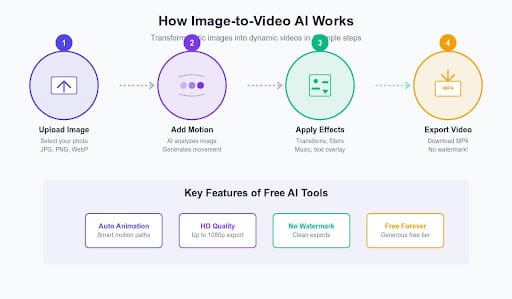
Why AutoReel Works for Real Estate Video at Scale
AutoReel is designed specifically for real estate professionals who need fast, consistent listing videos without manual editing. Automating sequencing, pacing, and formatting, it allows agents and photographers to create social-ready videos in minutes while keeping quality uniform across every property.
Why agents and photographers choose AutoReel:
- Creates listing videos in 10–15 minutes without editing timelines
- Produces consistent, professional output optimized for social platforms
- Enables photographers to resell videos and increase average order value
AutoReel makes real estate video creation fast, consistent, and scalable without adding complexity to daily listing pipelines.
Make Real Estate Video a Repeatable Advantage
Real estate video is most effective when it fits seamlessly into everyday listing workflows. Tools built for automation and consistency outperform general video editors, especially at scale. AutoReel addresses this need by turning listing content into professional, social-ready videos quickly, without adding manual effort or complexity.
Try AutoReel to turn listing videos into a repeatable, scalable part of your pipeline.
FAQs
1. What is the best real estate video maker for beginners?
The best real estate video maker for beginners focuses on automated video creation rather than manual editing. Tools that automatically manage sequencing, pacing, and formatting help agents create professional real estate marketing videos without technical skills or complex workflows.
2. Can AI real estate video editors replace professional videography?
An AI real estate video editor does not replace cinematic or luxury videography. However, it works well for everyday listings, producing consistent real estate marketing videos faster and at a much lower cost than traditional video production.
3. How long does automated video creation take?
Most real estate video maker platforms built for automated video creation produce listing videos in under 15 minutes. An AI real estate video editor like AutoReel can generate a one-minute listing video within 10 to 15 minutes.
4. Are real estate marketing videos worth the effort?
Yes. Real estate marketing videos significantly increase engagement, especially on social platforms. Videos created with a real estate video maker outperform static photos by holding attention longer and driving more interactions.
5. Do buyers care if a video is AI-generated?
Buyers care more about clarity and presentation than production methods. Professionally paced videos created with an AI real estate video editor are often indistinguishable from traditionally edited real estate marketing videos.
6. How much do real estate video makers cost?
Real estate video maker pricing varies widely. Traditional videography costs $250–$1,000 per listing, while automated video creation tools can cost as little as $10–$15 per video.
7. Can photographers resell videos made with a real estate video maker?
Yes. Many photographers resell real estate marketing videos created with a real estate video maker for $80–$300 per listing, making automated video creation a high-margin service.
8. Do real estate video makers work for luxury listings?
Yes. A real estate video maker works well for luxury listings focused on online and social promotion. While it doesn’t replace cinematic walkthroughs, an AI real estate video editor ensures fast, consistent exposure.
9. Can real estate video makers be used for rental properties?
Yes. Automated video creation helps rental listings stand out in competitive markets. A real estate video maker allows agents to produce real estate marketing videos quickly for multiple units without added effort.
External References
- Real estate photographers discussing video upsells and automated tools
- Real estate video marketing tools and short-form listing video strategies
- How to create real estate marketing videos using templates
- Real estate video marketing tips and template-based video creation
- Creating real estate videos with design-based templates