Top 7 Reasons Realtors Choose AutoReel for Real Estate Video Marketing (2026)

Summarize with AI


Key Takeaways
- AutoReel enables Realtors to turn listing photos into professional videos within minutes.
- Photo-to-video removes barriers to filming, making video possible for every listing.
- One-click MLS imports streamline workflows for agents and media companies.
- Built-in editing, captions, and branding reduce reliance on multiple tools.
- Scalable pricing and AI add-ons make video sustainable, not selective, in 2026.
Real estate video is the fastest way to win listings and stay visible in 2026. The challenge isn’t proving it works, but producing consistent, high-quality videos without extra time or complexity. That’s why Realtors and media teams choose AutoReel, a real estate-first AI video platform built for speed and scale.
If you’re trying to win more listings, get more showings, and scale content without hiring an editor, real estate video is the fastest lever you can pull. The issue is: most agents and media teams don’t have time to shoot and edit daily.
That’s why tools in the best AI video tools category are exploding right now—especially ones built specifically for Realtor workflows. AutoReel sits in that sweet spot: fast, repeatable, real-estate-first video creation designed for agents and real estate media houses. AutoReel’s approach combines speed, consistency, and predictable autoreel app pricing, including an accessible autoreelapp.com pricing free plan.
If you’re still on the fence, this breakdown of why creating video content is essential for Realtors explains exactly why video consistently outperforms static posts.
Quick Snapshot: What AutoReel Actually Does
AutoReel is an AI real estate video editor and creator that helps you:
- Turn listing photos into portrait or landscape videos
- Import photos from Zillow or Realtor.com in one click
- Add captions, music, branding, and templates
- Enhance your media with AI virtual staging, AI photo edits (twilight, lawn repair, and more)
- Generate AI voiceovers, social captions, and even AI avatars
- Produce ready-to-post videos fast (often within minutes)
You can explore the full product experience here: AutoReel
And the big difference: Agents get access to these features under one subscription, including AutoReel Studio plus premium AI tools like virtual staging and AI photo edits—so your workflow stays consistent as you scale across more listings.
Top 7 Reasons Realtors Choose AutoReel
1) It turns listing photos into a real estate video in minutes (photo-to-video)
This is the big one.
AutoReel’s core promise is simple:Upload listing photos → AutoReel converts them into cinematic video tours in portrait or landscape orientation.
You simply drop images into AutoReel editor video workflows, eliminating filming while keeping output professional and repeatable. And it is not just speed. Quality matters, especially when you are representing luxury listings or brand-sensitive brokers.
“The future is here! AutoReel surpasses the rest in terms of quality and accuracy. The generations look authentic with clean movements and tasteful add-ons.”
— Don Horn, Owner, Blu Lemonade Photography
This autoreel ai photo to video real estate workflow makes video possible even when no on-site footage exists. AutoReel also explains why photo-to-video tools matter and how they compare in its guide: 7 tools to turn real estate photos into videos.
It’s essentially an AI photo-to-video engine designed specifically for properties—so you’re not fighting a generic video editor that was built for influencers or gaming clips.
Why that matters for Realtors
- You can produce “video listings” even if you did not shoot video.
- You can market every listing as video, consistently.
- You can repurpose the same asset across multiple platforms.
AutoReel claims videos are typically ready in 10–15 minutes, which fits the reality of agent schedules. Fast output paired with predictable autoreel app pricing makes weekly video publishing sustainable in 2026.
2) One-click import from Zillow and Realtor.com (Instant workflow)
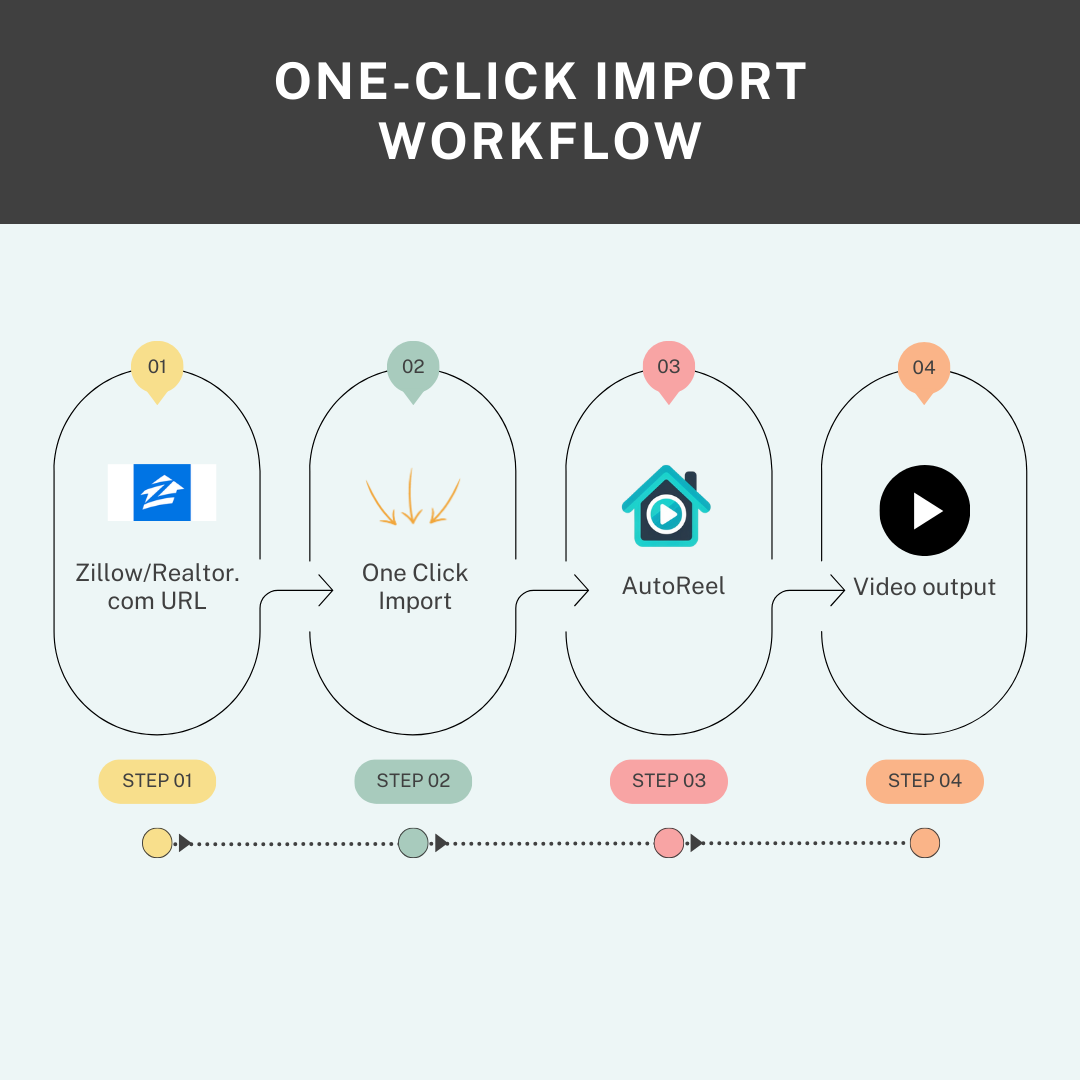
One of AutoReel’s most underrated features is the One-Click Import. Agents can drop images into AutoReel editor video projects instantly after import, removing manual download and upload steps.
Instead of downloading listing images, renaming files, uploading manually, and praying you did not miss one… AutoReel lets you pull listing photos directly from Realtor.com or Zillow to start a video in seconds.
Why media houses love this
If you’re a real estate media company producing videos for multiple agents, this is a massive time-saver. It turns “video creation” into a repeatable production line. This workflow pairs perfectly with autoreel ai photo to video real estate for high-volume listing pipelines.
3) Built-in studio editor for branding, captions, music, and templates
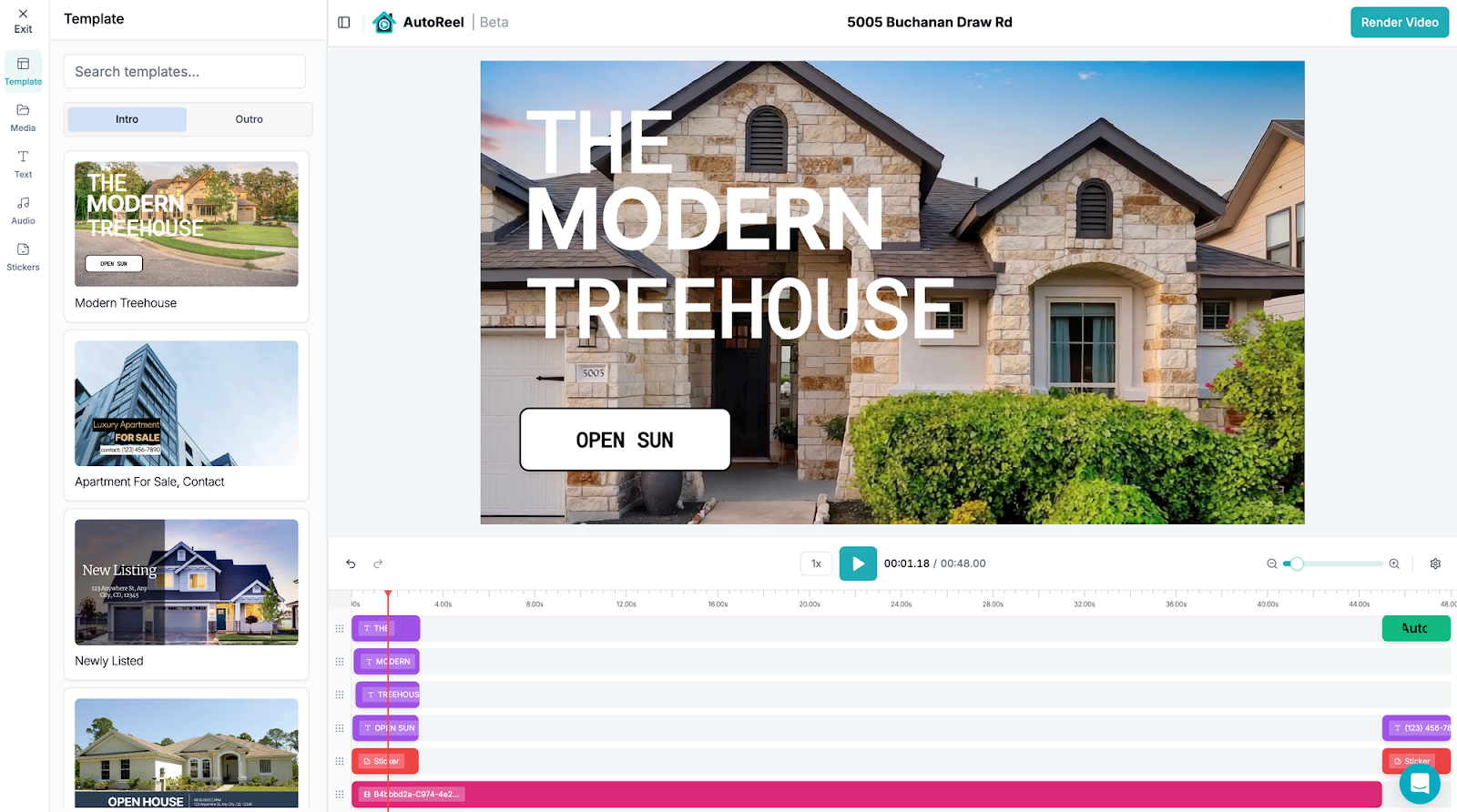
AutoReel is not just a generator—you also get AutoReel Studio, the built-in editor.
From the site: it lets you customize videos with templates, music, captions, branding, and even your own photos or clips.
What this solves (in real life)
- Consistency across your brand
- Better agent recognition
- Easy social-ready edits without exporting to another tool
The Studio experience aligns cleanly with autoreel ai photo to video real estate workflows at scale. This is especially useful for agencies and media houses that need:
- consistent branding packages
- multiple client versions
- fast revisions
Studio access is included across autoreel app pricing, avoiding surprise upgrade costs later.
4) Real estate-specific extras that actually drive value
AutoReel goes beyond a basic AI real estate video editor by including add-on tools that normally require separate apps.
Here are the key ones from the site:
AI Virtual Staging
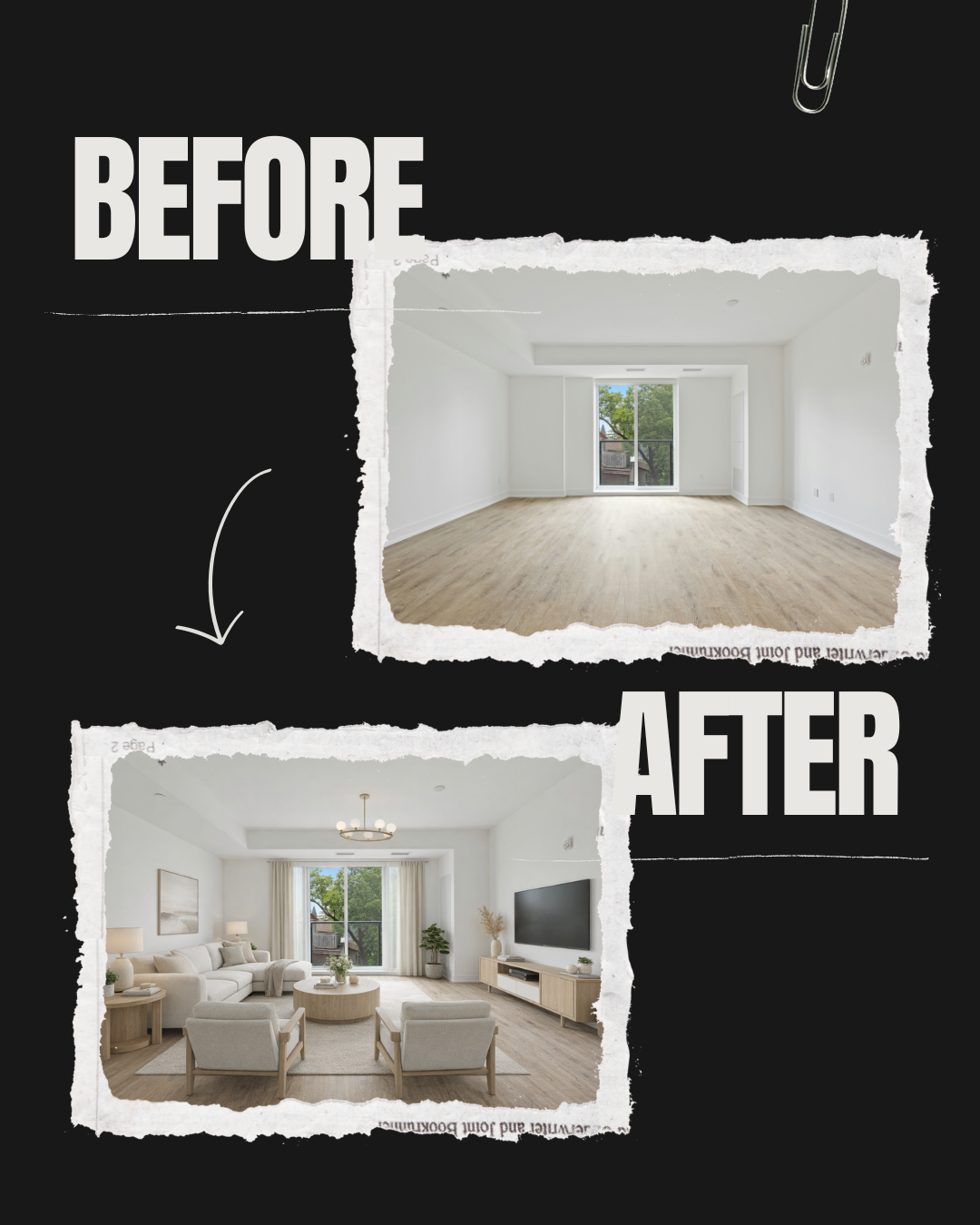
Instantly furnishes empty rooms with realistic AI staging.Great for: vacant listings, flips, rentals. These enhancements integrate directly into Autoreel AI photo to video real estate pipelines without exporting assets.
AI Photo Edits
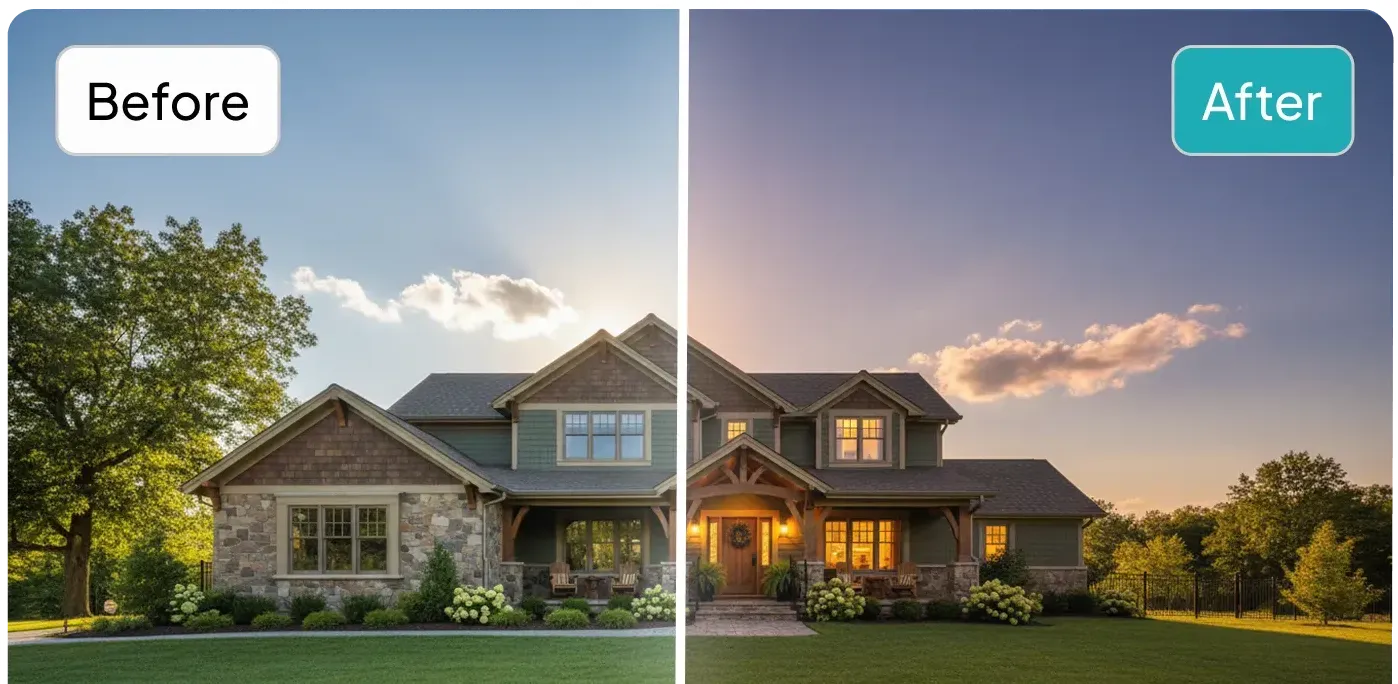
AI-powered enhancements like twilights, lawn repairs, and other edits to elevate listing photos.Great for: agents who want “premium-looking listings” without expensive post-production.
This is huge for decision-making, because AutoReel becomes more than a video tool—it becomes a mini real estate marketing suite.
If you want a deeper look at how staging and AI photo enhancement impact buyer perception, read Virtual Staging and AI Photo Editing Explained.
5) AI Voiceovers + AI Avatars for “face-on-camera” content (without filming)
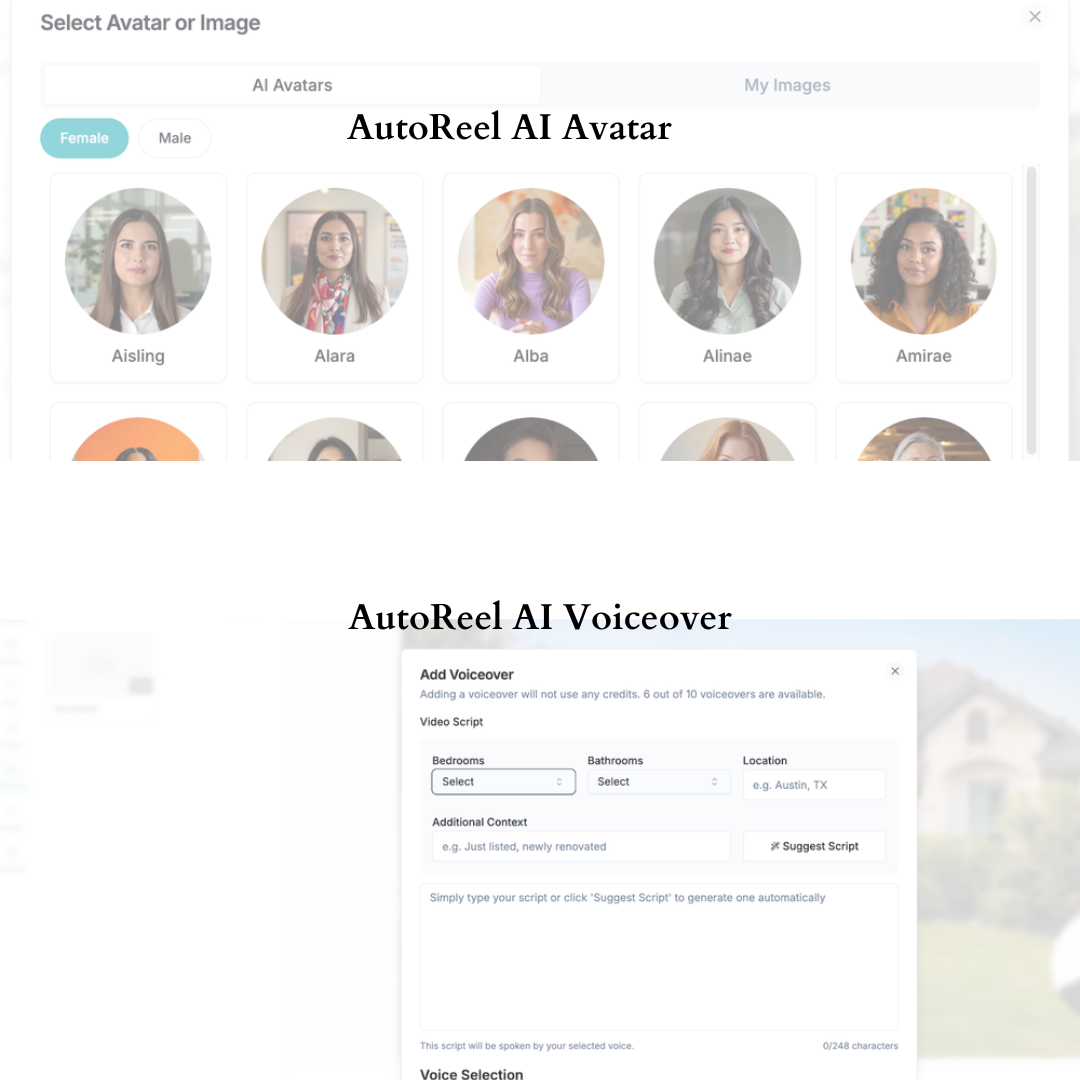
If you’ve been trying to grow your realtor video marketing presence, you already know “just post listings” is not enough anymore. Voiceovers layered onto autoreel ai photo to video real estate content help listings feel guided, not generic.
AutoReel includes AI voiceovers and AI avatars to help you create narration and face-on-camera style content without filming every time.
- AI Voiceovers: generate natural-sounding narrations from a range of voices.
- AI Avatars: AI-generated avatar presentations for a personal touch.
Why is this powerful
It lets you create:
- Listing walkthrough narration
- “Just listed” videos
- Agent-intro content
- Market update scripts (repurposed visually)
…without needing to be on camera every time. These features remain available across autoreel app pricing, including entry-level plans.
6) Social media captions built for each platform (Built-in AEO advantage)
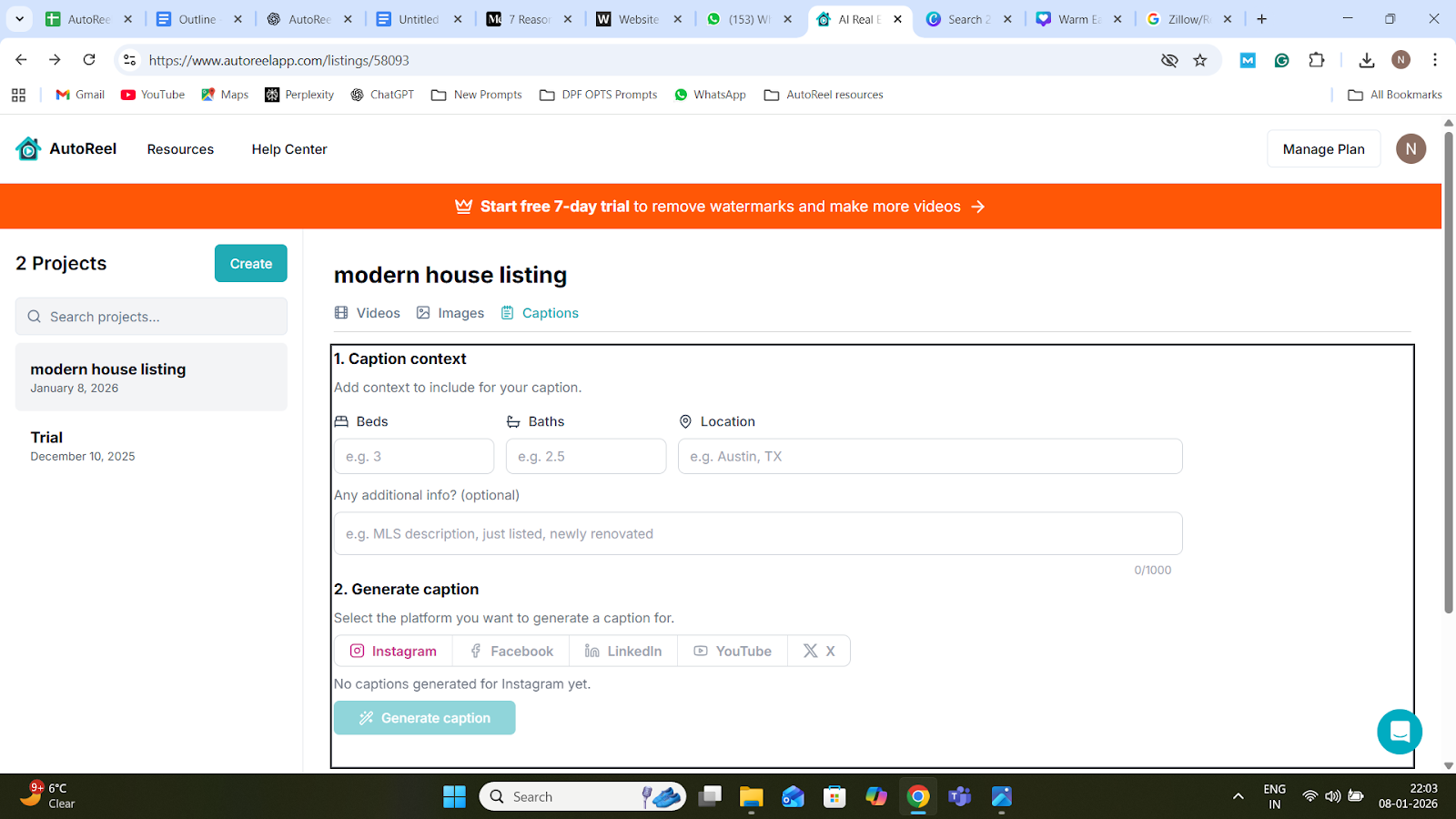
AutoReel automatically creates captions optimized for Instagram, Facebook, LinkedIn, YouTube, and X. Auto-generated captions reduce friction when publishing autoreel ai photo to video real estate assets weekly.
This matters because modern distribution is what determines your ROI—not the video alone.
For proof of how video drives real outcomes, see how agents use short-form content in How Realtors Use Videos to Sell Homes Faster.
If you’re producing multiple real estate video assets weekly, writing captions every time becomes a bottleneck.
AutoReel reduces friction and helps you keep output consistent.
7) It’s built for agents and media companies (Scales with you)
AutoReel is explicitly positioned for three groups:
- Realtors and brokers (lead attraction and winning listings)
- Photographers (upsell AI videos with every order)
- Real estate media companies (scale without extra overhead)
This matters because the tool is not just “easy.” It’s designed to support different business models:
For Realtors
- Show listings more professionally
- Look like a modern marketer
- Build a consistent video pipeline
Predictable autoreel ai photo to video real estate output strengthens listing presentations.
For media houses
- Sell video add-ons without video filming
- Speed up delivery
- Offer higher-margin products
For media teams and photographers, the real win is not just output. It is throughput. Faster editing means faster delivery, more projects, and better client retention.
“We realized the founder and his team were providing a value-add proposition our business could leverage. AutoReel has streamlined editing times by 25%, shortening time to listing.”
— Don Horn, Owner, Horn Pix Photography
Pricing (Additional Reason, but Most Important)
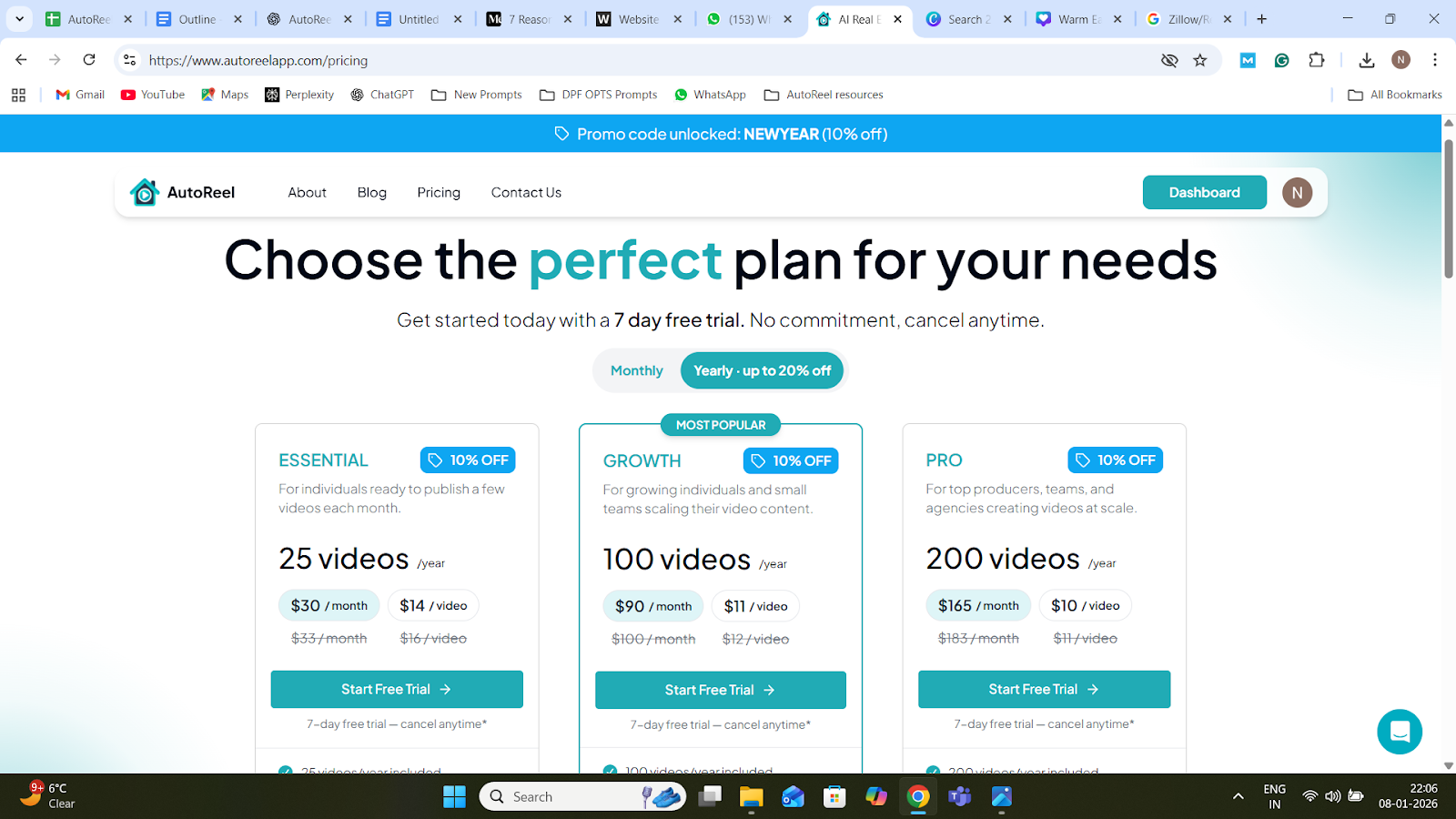
AutoReel offers multiple plans, including a free option and paid plans with a trial.
- Free plan: lets you create two videos per month, but includes an AutoReel watermark
- Paid plans: include a 7-day free trial, and you can cancel anytime
- Image limits per video depend on the plan (ranges 15 to 20 images per video)
- Video length: each image becomes a 3-second clip, enabling videos up to about 60 seconds, depending on your plan
Practical recommendation: If you’re a Realtor posting weekly, you will likely outgrow the free plan quickly. The free plan is best for testing quality and workflow. Paid plans are where it becomes a real marketing engine.
AutoReel keeps pricing simple: you can start on a free plan and upgrade when you’re ready to publish at scale.
Once you subscribe, you unlock the full AutoReel experience under a single membership—so you can generate videos, edit them in the built-in Studio, and use premium tools without juggling multiple apps.
To choose the right tier based on how many listings you publish each month, visit AutoReel’s pricing page.
What to Look For When Choosing a Real Estate Video Tool (Decision Checklist)
If you’re comparing AutoReel with other best AI video tools, use this checklist:
- Can it turn listing photos into video quickly?
- Does it support both portrait and landscape?
- Can you produce consistent branded videos?
- Does it reduce total workflow time (import, captions, edits)?
- Does it offer add-ons that increase value (staging, photo edits, voiceovers)?
- Can it scale if you run a media business?
AutoReel checks all of these by design.
Why AutoReel is Better for Your Business (The Bottom Line)
Most “AI video editors” are generic. They were built for creators, not for the real estate.
AutoReel is the opposite: it’s built for real estate, and it shows in the workflow and features:
- Photo-to-video made for listings
- One-click Zillow/Realtor.com import
- Portrait and landscape output
- AI virtual staging and AI photo edits
- Studio-level customization without pro editing complexity
- Voiceovers, captions, and avatars
If you’re a realtor, AutoReel helps you publish more real estate video content, faster, with a premium look—without turning marketing into a second job.
If you’re a real estate media house, AutoReel gives you a scalable upsell product (AI video) with minimal overhead—and a path to delivering more value per shoot.
That’s why realtors choose AutoReel: not because it’s “AI,” but because it’s practical, repeatable, and built for real estate video marketing outcomes.
Want to see how AutoReel fits your workflow? Contact the AutoReel team, and they’ll help you pick the right plan and setup for your business.
FAQs
1) What is AutoReel used for?
AutoReel is an AI-powered platform built for real estate professionals to create polished real estate video content from listing photos. Realtors, photographers, and media companies use it to produce social-ready property videos quickly for marketing, lead generation, and faster listing promotion.
2) Does AutoReel support photo-to-video for real estate listings?
Yes, AutoReel includes an Image to Video feature that converts property photos into smooth video tours. You upload your images (or import them), choose a format, and AutoReel creates a professional real estate video designed for modern social platforms.
3) How long does AutoReel take to create a video?
Most videos are typically ready in about 10 to 15 minutes. Processing time may vary based on factors like server demand and project size, but the workflow is designed for fast turnaround without manual editing.
4) Can AutoReel import listing photos from Zillow or Realtor.com?
Yes, AutoReel supports one-click import of listing photos directly from Zillow and Realtor.com. This eliminates manual downloading and uploading, making it faster to create marketing videos for new listings and helping agents and media teams streamline production.
5) Can I add branding like logos, captions, and music?
Yes, AutoReel Studio lets you customize your videos with templates, captions, music, and branding elements like logos and colors. You can also add your own media clips and photos, which helps maintain a consistent professional look across every listing.
6) Can AutoReel make portrait videos for Instagram Reels and TikTok?
Yes, AutoReel supports portrait videos for platforms like Instagram Reels and TikTok. If you create a landscape video, you can also crop it to 9:16 inside AutoReel Studio, making it easier to publish across multiple platforms.
7) How many images can I use per video?
The number of images per video depends on your AutoReel plan, ranging from 15 to 20 images per video. This is enough for most listings and helps keep videos paced and social-media friendly.
8) How long are AutoReel videos?
AutoReel videos are built using a set timing per image. Each photo becomes a 3-second clip, so video duration depends on how many photos you include. This structure helps produce short, engaging property videos that perform well on social media.
9) Does AutoReel include AI virtual staging?
Yes, AutoReel includes AI Virtual Staging, which lets you furnish empty rooms quickly using AI. This is useful for vacant listings and new builds, helping buyers visualize the space without requiring expensive manual staging or additional photography sessions.
10) Does AutoReel include AI voiceovers?
Yes, AutoReel offers AI voiceovers with multiple voice options, allowing you to add narration to your real estate video content. This helps you explain property features, highlight selling points, and create more engaging listing videos without recording your own audio.
11) Does AutoReel have a free plan?
Yes, AutoReel offers a free plan that allows you to create two videos per month. Those videos include an AutoReel watermark. The free plan works well for testing quality and workflow before upgrading to a paid plan for more volume.
12) Is there a free trial for paid plans?
Yes, AutoReel offers a 7-day free trial on paid plans, giving you time to test features like photo-to-video creation, editing tools, and AI enhancements. You can cancel anytime, which makes it low-risk to evaluate before committing long-term.
13) Does AutoReel have a free plan for Realtors in 2026?
Yes. The free plan on autoreelapp.com lets Realtors create 2 videos per month with a watermark. It’s ideal for testing quality, speed, and workflow before upgrading. Many agents start free, then move to paid autoreel app pricing for consistent weekly publishing.
14) How does AutoReel turn listing photos into videos without filming?
You simply drop images into the AutoReel editor video projects, and the autoreel ai photo to video real estate engine creates smooth, professional listing videos. No filming or manual editing is required, making video creation fast, repeatable, and scalable for every listing.
Sources:
https://www.trustpilot.com/review/autoreelapp.com
https://www.imagine.art/blogs/ai-video-generators-cost
https://cybercorsairs.com/autoreel
https://noteableai.com/ai-tools/autoreel
https://www.g2.com/products/autoreel/reviews
https://eliteai.tools/tool/autoreel
https://www.aiedgeforrealtors.com/blog/why-realtors-are-turning-to-autoreel-for-video-marketing