Virtual Staging & AI Photo Editing Explained: How They Transform Real Estate Listings (2026)

Summarize with AI



Imagine scrolling through a property listing and watching virtual staging AI transform an empty, lifeless room into a warm, beautifully furnished space. That simple before-and-after moment captures exactly how digital visuals are reshaping modern real estate.
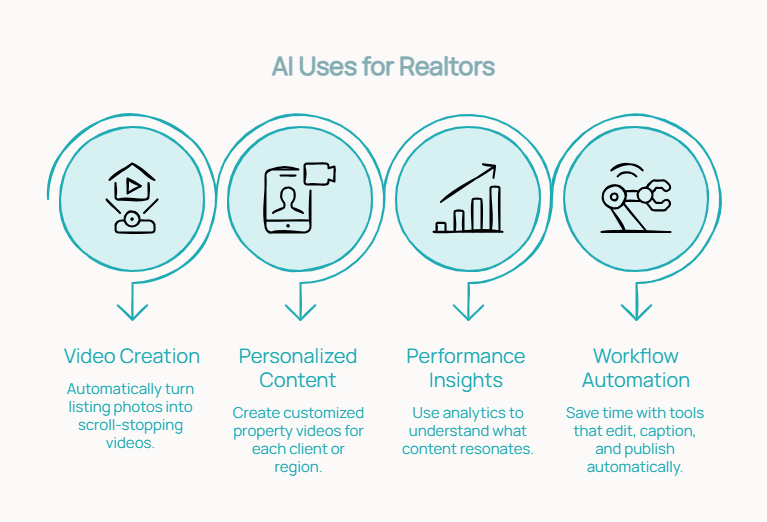
In a market where buyers make split-second decisions online, too many listings still rely on dull photos, vacant rooms, or poorly lit interiors that fail to spark interest. The answer lies in the rise of virtual staging vs real staging, which, along with powerful AI real estate editing tools, enhances, furnishes, and elevates listing photos within minutes.
of buyers say photos are the most important factor when browsing listings online (NAR)
of buyers are more willing to visit a home they saw staged online
less expensive than traditional staging — typically $10–$75 per photo vs $1,500–$5,000+
What is Virtual Staging? A Simple Explanation
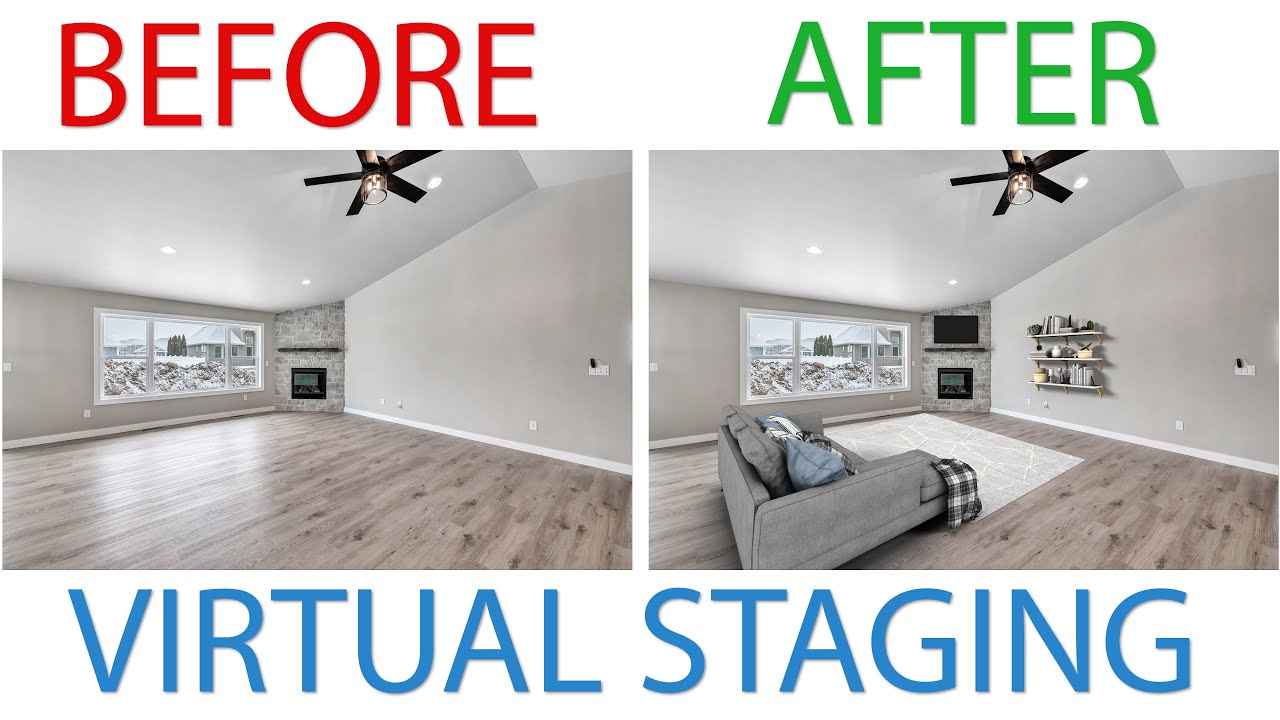
Virtual staging is the process of using digital tools to furnish, decorate, and visually enhance photographs of a property — without placing a single physical item in the room.
Instead of bringing in real furniture, designers or AI software overlay lifelike 3D furniture, décor, artwork, rugs, lighting, and even plants directly onto high-quality photos. The result feels like a fully styled home, created entirely on a screen. This is why many professionals now refer to it as digital staging for real estate.
Unlike traditional staging, which requires furniture rentals, movers, and setup time, virtual staging is faster, more affordable, and far more flexible. Agents can instantly switch from modern to minimalist, or from luxury to family-friendly, depending on the target buyer.
Real estate professionals typically use virtual staging for vacant homes, dated interiors, rental units, new-build off-plan properties, or any listing that needs a visual makeover.
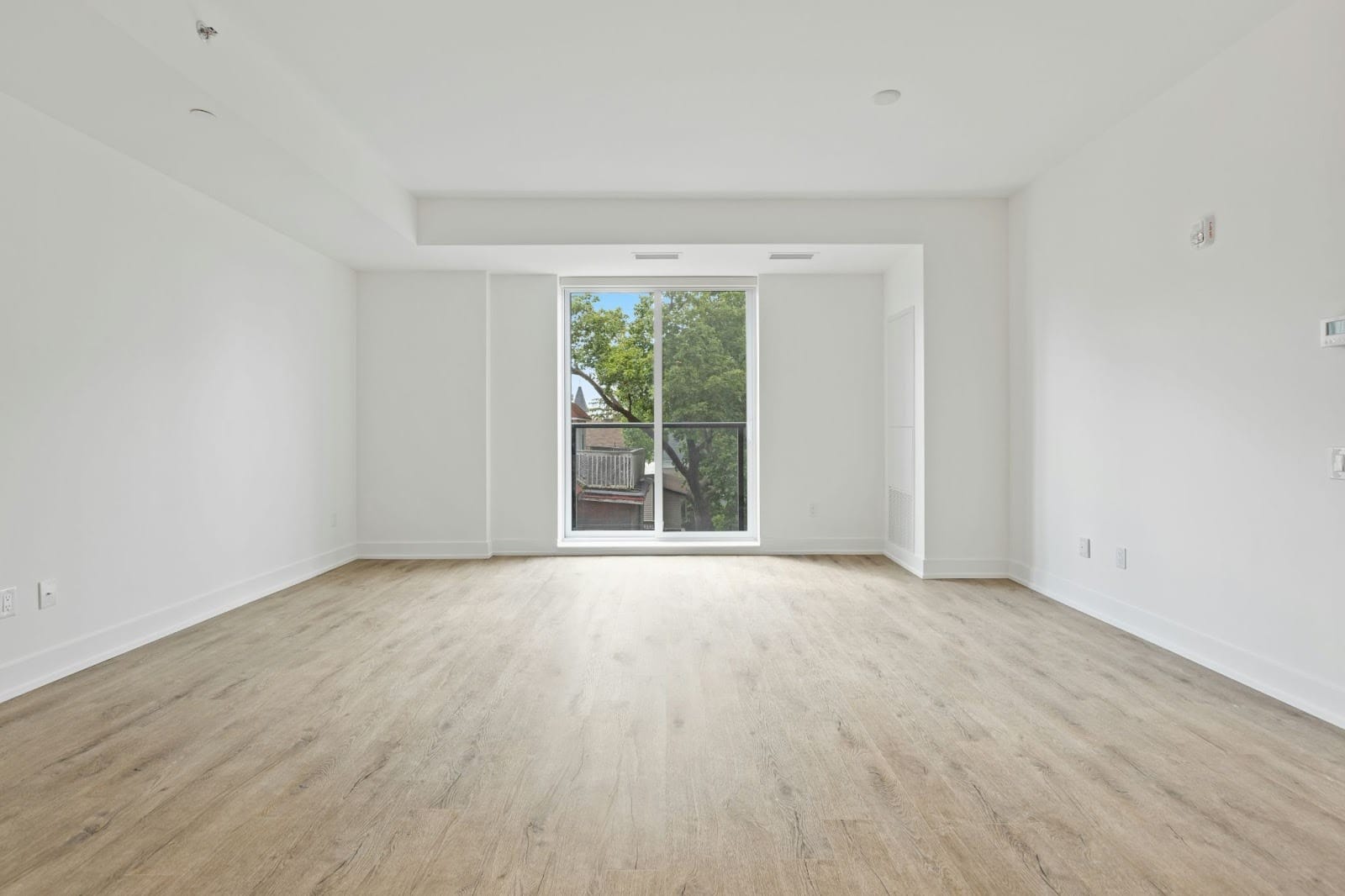
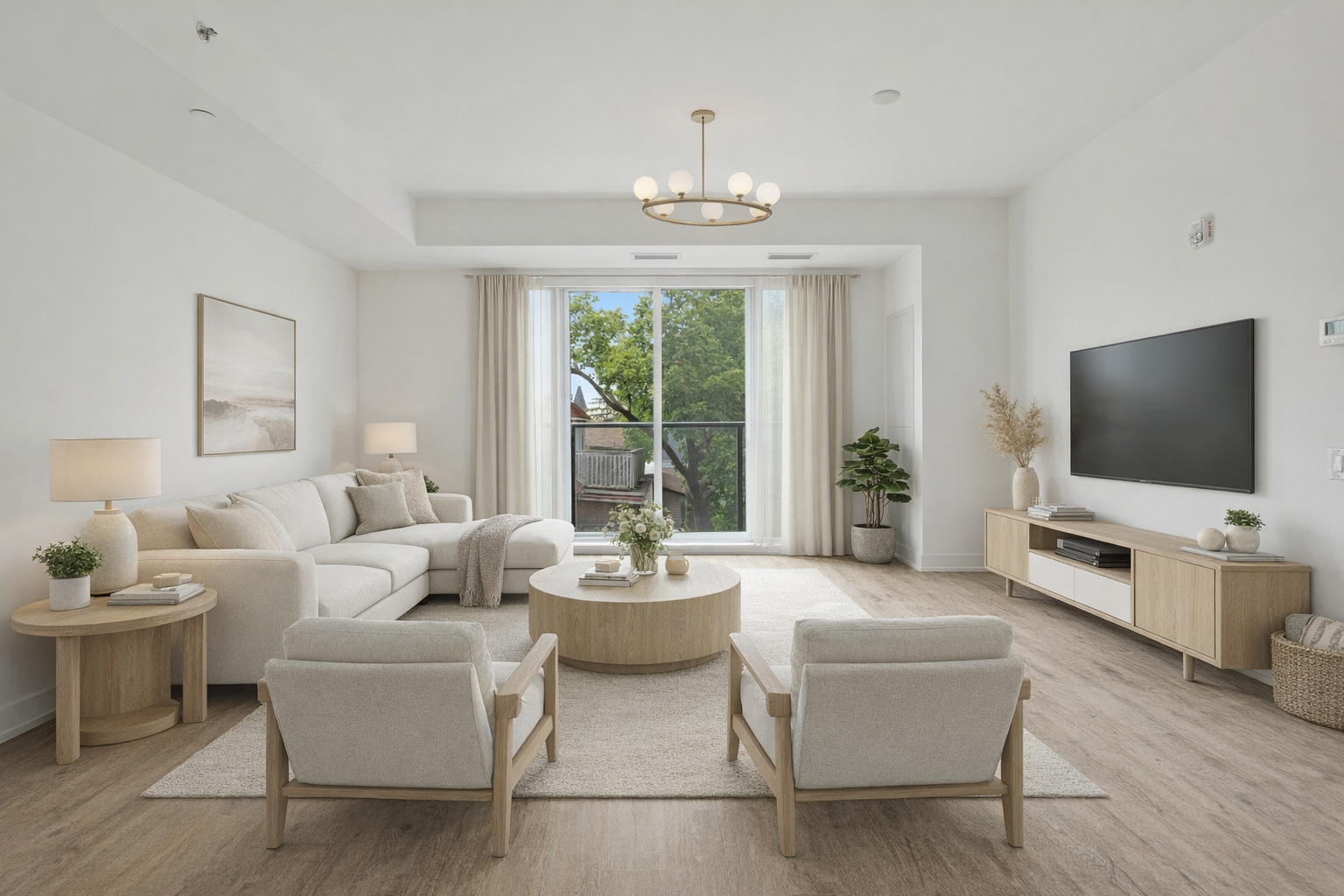
Before & After: Empty vs Virtually Staged Room — source
What is AI Photo Editing in Real Estate Marketing?
AI photo editing uses smart, automated software to instantly enhance property photos and make them look professionally shot. These powerful AI real estate photography tools analyse each image, identify flaws, and upgrade the visuals within seconds — no advanced editing skills required.
What can AI photo editing do?
AI can transform average photos into eye-catching listing images through:
Why AI matters for real estate agents
In a digital-first market, AI photo editing solutions for real estate help agents elevate their visuals effortlessly — boosting engagement, buyer interest, and overall listing appeal.
Why Visual Presentation Matters More Than Ever
In today's digital-first real estate market, a listing's visuals can determine whether a buyer clicks, scrolls, or books a showing. According to multiple NAR (National Association of Realtors) studies, over 80% of buyers say that photos are the most important factor when browsing listings online.
Another major staging report notes that 63% of buyers are more willing to walk through a home they saw staged online, and over half say staging influences the price they're willing to pay.
How staged images shape buyer decisions
Staged photos do more than look pretty — they help buyers visualise living in the home, which is the most significant psychological driver of purchase decisions. Furnished rooms feel warmer, more functional, and more spacious. This leads to:
Essentially, staged images help a property tell a story.
Why this matters even more today
With so many online-first and remote buyers, especially post-pandemic, photos often serve as the first and sometimes only impression of a home. In competitive markets where listings fight for attention, stunning visuals can be the difference between getting buried in search results and getting multiple offers.
Virtual Staging vs Physical Staging: Cost, Speed, and Impact
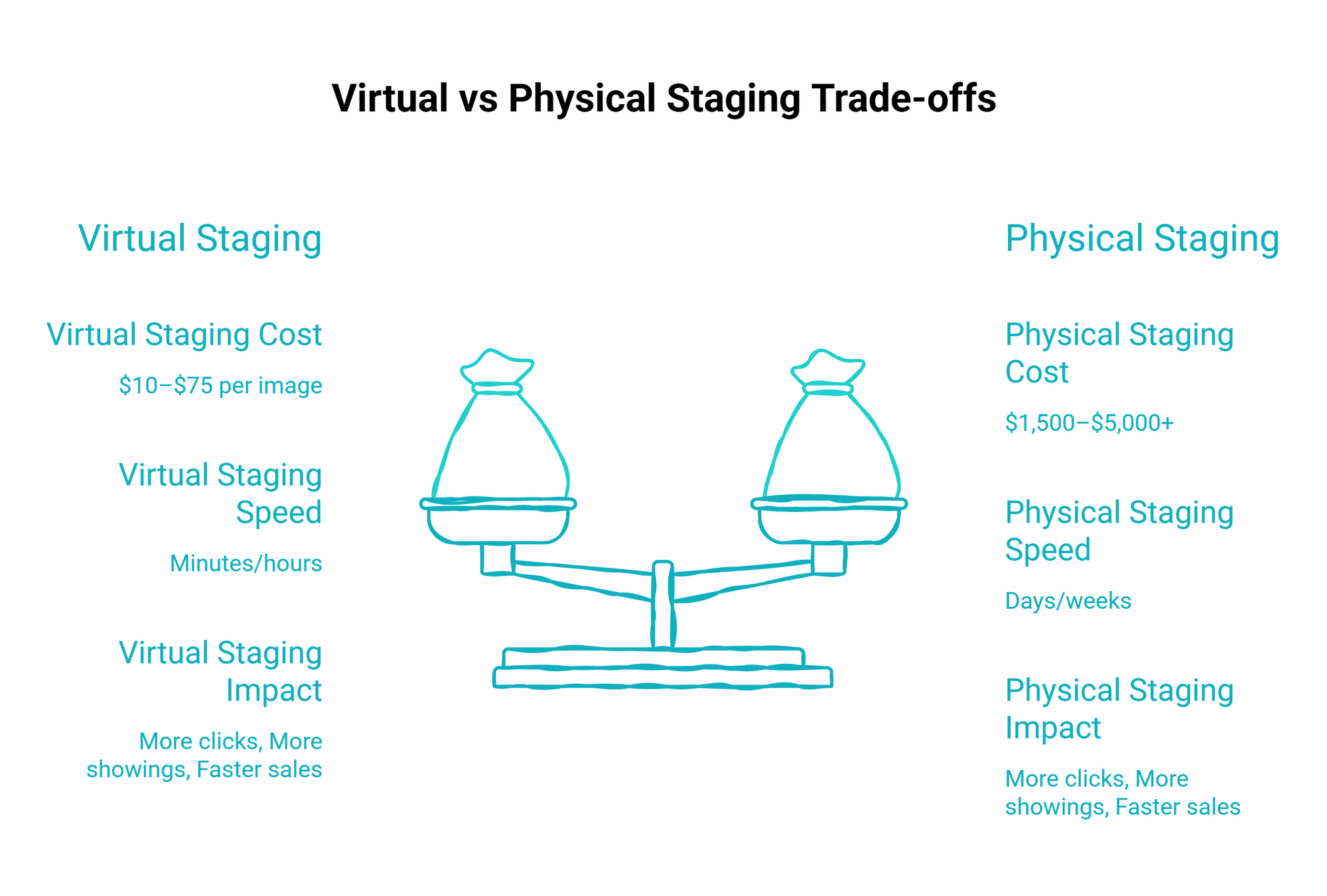
When comparing virtual staging to traditional staging, the differences in cost, speed, and real-world results make it clear why digital staging has become the preferred choice for modern real estate marketing.
1. Cost comparison: Real furniture vs digital staging
Traditional staging cost (USD): Requires renting furniture, décor, movers, and professional styling. Typical price: $1,500–$5,000+ per home, depending on size and the length of stay. Additional monthly rental fees can push the total even higher.
Virtual staging cost (USD): Uses software to digitally furnish and decorate listing photos. Typical price: $10–$75 per photo, or affordable subscription packages for frequent users. No movers. No rentals. No physical labour. Just instant, polished visuals.
2. Speed comparison: Days/weeks vs minutes/hours
Traditional staging: 3–7 days for scheduling, setup, photography, and teardown.
Virtual staging: AI-generated or designer-edited images can be delivered in 30 minutes to 24 hours, and with AI tools like AutoReel, staged images are generated in <1 minute. Perfect for fast-paced markets and quick listing launches.
3. Impact on listing engagement and buyer behaviour
Virtual staging consistently delivers measurable improvements:
Buyers connect more deeply with homes that look furnished, functional, and easy to imagine living in.
4. Mini case study: From stale to sold
A vacant home in a competitive market had almost no activity for six weeks. After switching to virtually staged photos:
A simple visual makeover changed everything.
If you're exploring virtual staging to elevate your listings, check out the latest plans from AutoReel. During the Beta phase, virtual staging and AI photo editing are completely free and included with all subscriptions.
Virtual vs Physical Staging Trade-Offs
How Virtual Staging Works: Step-by-Step Overview
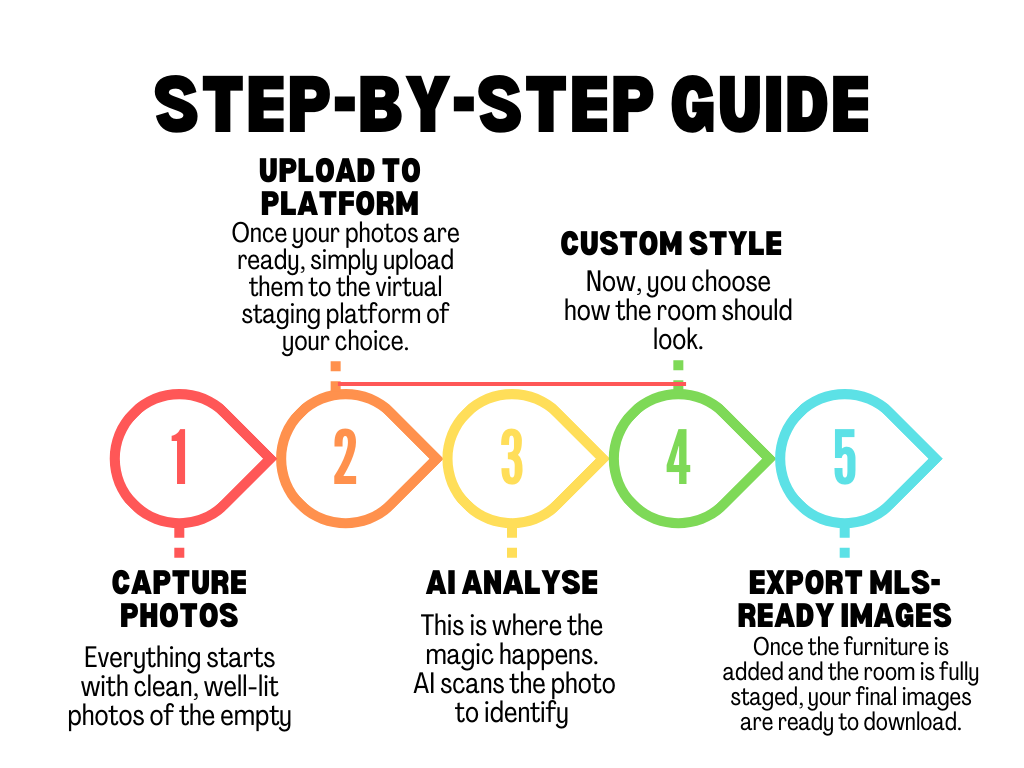
Virtual staging may look high-tech, but the process is surprisingly simple. Whether powered by AI or handled by a designer, it follows a clear workflow that transforms an empty room into a beautifully styled space in minutes.
Capture high-quality room photos
Everything starts with clean, well-lit photos of the empty (or sparsely furnished) room. Shoot during the day for natural light, avoid unusual angles, and use wide-angle shots to capture the full space. These base images become the "canvas" for virtual staging.
Upload photos to a virtual staging platform
Simply upload your photos to the virtual staging platform. Most tools accept JPEG / PNG images and multiple room uploads at once. This step takes less than a minute.
AI analysis: Understanding the room
AI scans the photo to identify objects, depth, perspective, floor and wall boundaries, and lighting direction. Advanced tools use 3D modelling to place furniture in the correct orientation, size, and lighting conditions.
Customise your interior look
Choose your design style (modern, luxury, farmhouse, minimalist, Scandinavian), furniture sets, colour palettes, and room type options. This customization ensures your staging appeals to your ideal buyer.
Export MLS-ready images
Your final images are ready to download as high-resolution photos sized for MLS, web-optimized images for listing portals, and social media-ready versions for marketing campaigns.
Want to see this process in action? Watch this step-by-step video guide to learn exactly how to virtually stage a home — from uploading photos to exporting MLS-ready images — in just minutes.
Step-by-step guide to virtually staging a home with AutoReel.
Key Benefits of Virtual Staging & AI Photo Editing
Virtual staging and AI-enhanced photo editing have become essential tools for real estate marketing, offering a blend of speed, affordability, and high visual impact.
Beautifully staged images for a fraction of traditional staging. No rentals, movers, or setup — just fast, high-quality digital visuals.
AI tools generate fully furnished, realistic interiors in minutes to 24 hours, helping agents get listings online quickly.
Easily switch between modern, luxury, minimalist, or family-friendly styles. Create multiple versions of the same room or redefine its function.
Virtually staged listings attract more views, saves, enquiries, and showings by presenting warm, move-in-ready spaces.
Helps out-of-state and international buyers visualize room layout, scale, and flow — even without an in-person visit.
Ideal for teams, multifamily operators, and developers. Apply staging across dozens or hundreds of units quickly and consistently.
Real-World Use Cases and Case Studies
Virtual staging and AI photo editing aren't just "nice to have" — they're proven tools being used across nearly every corner of the real estate market.
1. Vacant luxury homes
Buyers immediately understand the scale, flow, and lifestyle potential — key factors that influence premium-price sales.
A giant empty living room lacking warmth or depth.
A stylish, modern lounge setup with plush seating and ambient lighting that showcases the room's luxury appeal.
2. Small or awkward spaces
Helps buyers visualize usable living zones, improving perceived value.
A narrow room with no clear purpose.
A clever home office layout demonstrating productivity potential.
3. Multifamily units & Airbnb rentals
Faster bookings, higher occupancy, and greater guest expectations.
A basic rental room with no personality.
A stylish, Airbnb-ready setup designed to appeal on social media and booking platforms.
Ethical and Legal Considerations
When using virtual staging, transparency is essential. Most MLS platforms require a clear "Virtually Staged" disclosure so buyers understand the images have been digitally enhanced. This legally protects both the agent and the client while maintaining trust.
Equally important is knowing what not to alter. Virtual staging should never hide structural damage, change room dimensions, remove permanent fixtures, or digitally create views that don't exist.
Proper virtual staging disclosure isn't just about compliance — it's about preserving credibility and ensuring buyers feel confident in what they're viewing.
Stage, enhance, and create videos — all from one platform
AutoReel includes AI Virtual Staging free with every subscription. Turn staged photos into listing videos in minutes.
How to Get Started: Tools, Tips, and Best Practices
1. Recommended Virtual Staging & AI Photo Editing Tools
Here are some trusted options agents rely on:
AutoReel stands out for its speed, affordability, and near-designer-level results, making it ideal for agents, teams, and developers.
2. Choosing the Right Style for Your Buyer
Virtual staging isn't one-size-fits-all. Choose looks that resonate with your target audience:
3. Photo-Taking Tips for the Best AI Results
The quality of your base photos significantly affects your final staging results:
4. Quick Checklist to Start Staging Today
Conclusion: The New Standard for High-Impact Real Estate Marketing
Virtual staging and AI photo editing have quickly evolved from optional add-ons to essential tools in modern real estate marketing. They deliver massive advantages — lower costs, faster turnaround times, flexible design options, and significantly higher buyer engagement.
In a world where buyers judge a property by its photos long before scheduling a visit, exceptional visuals are no longer a luxury — they're a necessity.
As the market shifts even more toward online-first browsing, agents who embrace digital staging now will stand out, attract more interest, and stay competitive. These tools don't just enhance photos — they shape first impressions, spark emotional connections, and help listings sell faster.
And to take your visuals even further, AI-powered video tools like AutoReel can turn your staged photos into engaging listing videos, reels, and social ads — perfect for capturing the attention of today's mobile-first buyers.
If you're ready to elevate your marketing, start by pairing virtual staging with AI editing and AutoReel for video. Your future buyers — and your results — will thank you.
Frequently Asked Questions
"AutoReel transforms photos into beautiful, realistic video walkthroughs. The Drone 'flyovers' are truly incredible! A must-have tool for realtors in a digital-first world."
Nicole Causey
Co-Founder, Everhome Realty
"An absolute game-changer! Professional-quality reels in minutes. Customer service is top-notch, quick and responsive."
Joe Semkow
Photographer, Inspire Kindness
"AutoReel has streamlined editing times by 25%, shortening time to listing. The team were providing a value-add proposition our business could leverage."
Don Horn
Owner, Horn Pix Photography