Virtual Staging Before and After: What Buyers Actually Notice

Summarize with AI


An empty room and a staged room aren't just different photos; they trigger different reactions. The empty room usually gets scrolled past. The staged room gets a saved listing and a showing request.
If you've ever wondered whether virtual staging actually changes buyer behavior, the clearest answer is in the images themselves. In this blog, you will find five real virtual staging before-and-after transformations: a living room, a kitchen, a dining room, and two bedrooms, paired with what buyers actually notice (and feel) when they see each one.
Why Buyers React So Differently to Empty vs. Staged Photos
Buyers don't evaluate listing photos logically; they react emotionally, in about the same time it takes to swipe. An empty room asks the buyer to do work: imagine furniture, guess the room's purpose, estimate scale. Most won't bother. A staged room does that work for them.
This gap is the entire case for staged vs unstaged photos. It's not decoration; it's translation. Empty rooms show space. Staged rooms show a life the buyer can picture themselves living.
Here's what consistently shows up in buyer reaction to staged photos.
- Scale finally makes sense: furniture gives buyers an instant, familiar reference point for room size.
- Purpose becomes obvious: a bonus room or awkward nook reads as "wasted space" empty, but as an office or guest room once staged.
- Warmth replaces sterility: staging adds light, texture, and color that make a home feel lived-in rather than abandoned.
- Photos hold attention longer: staged photos tend to get more clicks and longer view times than empty-room shots of the same property.
- Trust goes up: a well-staged room signals the seller cares about presentation, and buyers extend that assumption to the home's condition.
Let's look at where this plays out room by room.
Living Room: From Empty Shell to "I Can See Myself Here"
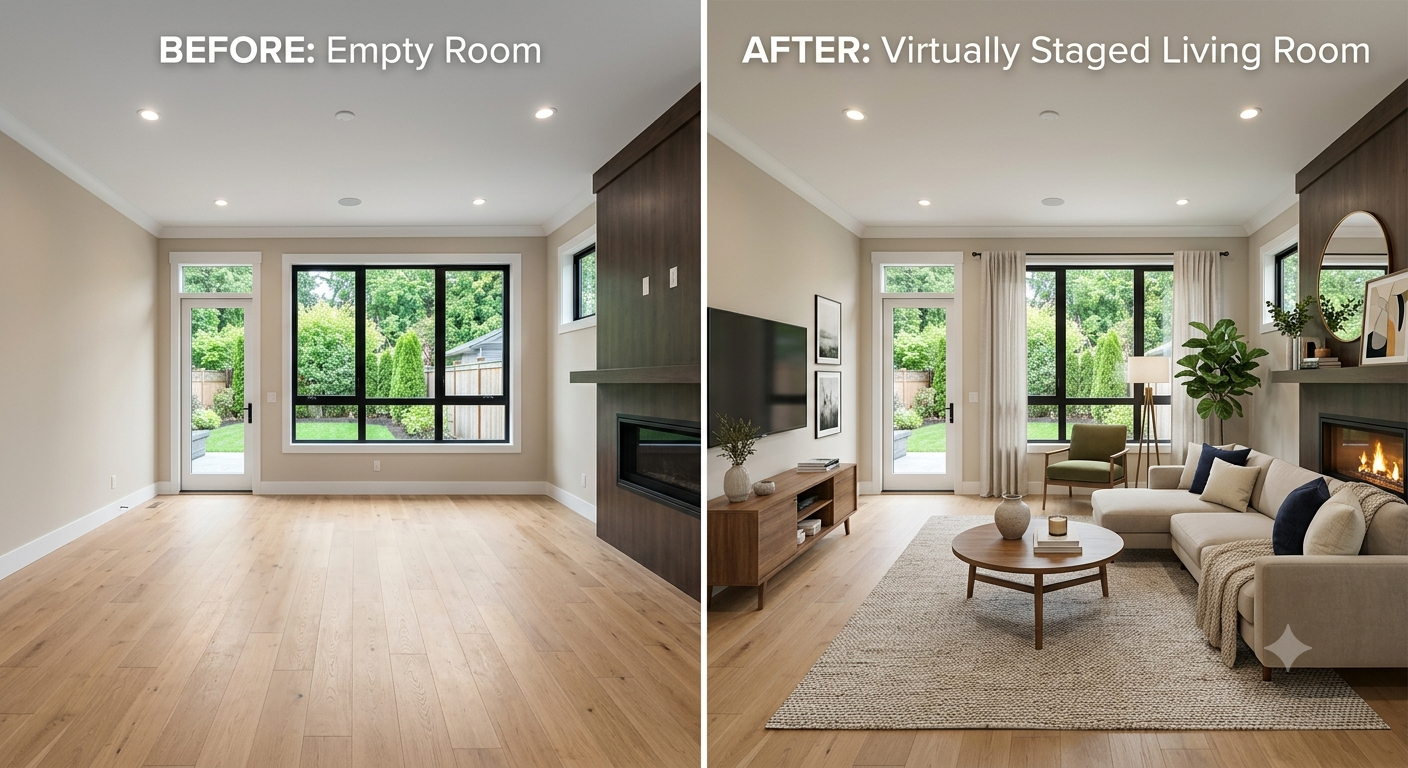
Before and after virtual staging of an empty living room transformed into a furnished living room with sofa, coffee table, TV console, and accent chair.
The empty version isn't bad, the light is good, the windows are large, the flooring is clean. But it's also a blank box. Buyers scrolling past this photo have no anchor: no sense of how a sectional would fit, whether the fireplace wall works with real furniture, or how big the room actually feels once it's lived in.
The staged version answers all of that immediately. The sectional and rug ground the space, the TV console anchors the fireplace wall, and the layered pillows and the plant add warmth without clutter.
This is one of the most effective before and after staging examples because it solves the single biggest objection buyers have with empty living rooms: "I can't tell if my furniture will fit."
What buyers notice first: the room finally has a "front" and a clear seating arrangement, their brain stops calculating and starts imagining.
Kitchen: Where "Functional" Becomes "Inviting"
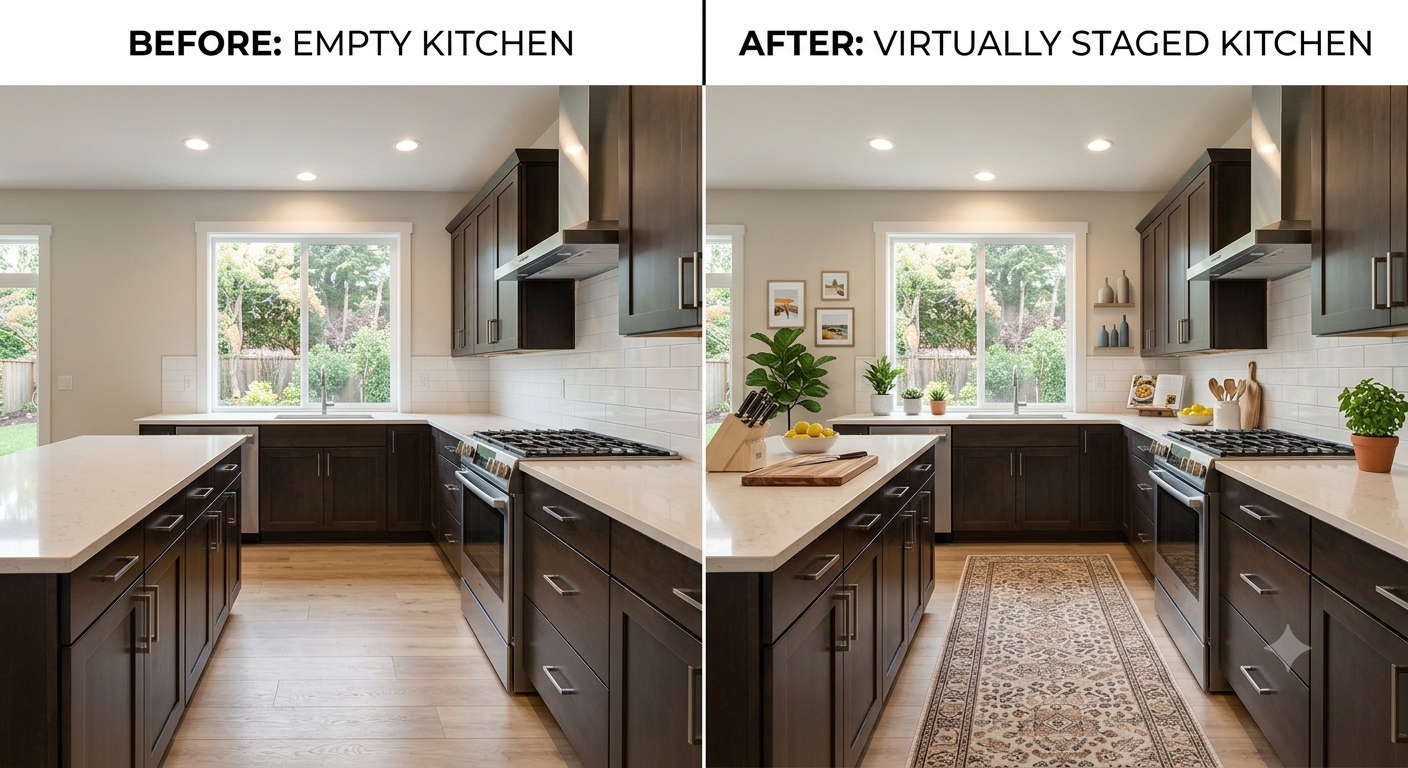
Before and after virtual staging of an empty kitchen island and counters styled with a runner rug, produce, cookbooks, and greenery.
Kitchens are unusual in staging because the before photo is already functional: cabinets, countertops, and appliances do the heavy lifting regardless of styling. But functional isn't the same as appealing.
The staged version adds a runner rug that breaks up the hard flooring, small styling touches on the counters, and open shelf details that make the cabinetry feel warmer instead of showroom-flat.
Nothing here disguises the kitchen's bones; it just removes the sterile, unused feeling that empty counters give off.
Buyer reaction pattern: Kitchens are consistently one of the rooms buyers say sways a decision; staging here has outsized impact relative to the effort.
Dining Room: Solving the "What Do I Even Do With This Space" Problem
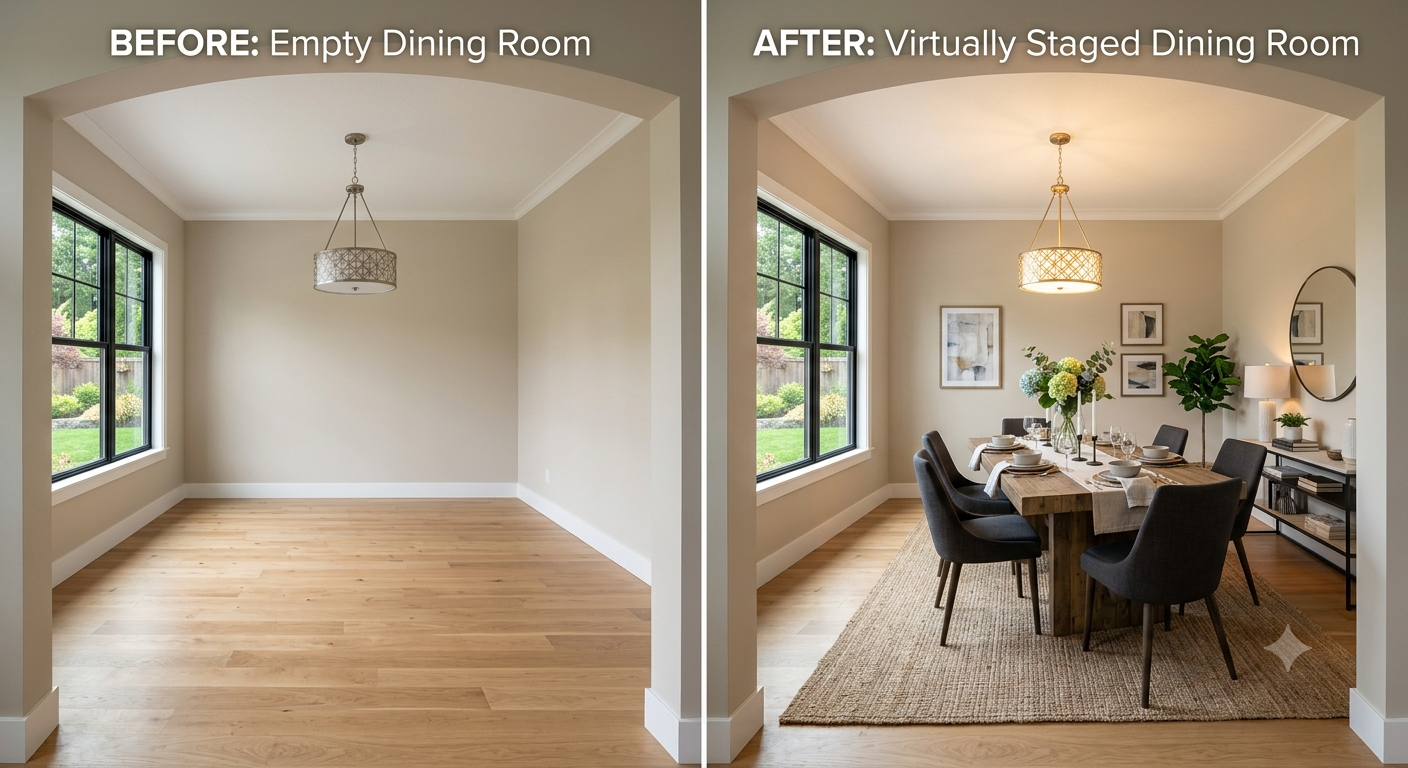
Before and after virtual staging of an empty dining room transformed with a dining table, six chairs, rug, and wall art.
Of all five rooms, this is the clearest case for staging. The empty dining room is genuinely hard to read, it's just a pendant light hanging over the hardwood floor. A buyer has to actively work to picture it as anything.
Add a table, six chairs, a jute rug, and a few pieces of art, and the ambiguity disappears instantly. Rooms like this are exactly why virtual staging photo examples tend to focus on dining rooms and flex spaces, they're the rooms buyers most often misjudge without help.
What changes in buyer perception: the room goes from "what would I even use this for?" to "this is where we'd host holidays"; a direct emotional upgrade, not just a visual one.
Bedroom 1: Turning a Corner Room Into a Retreat
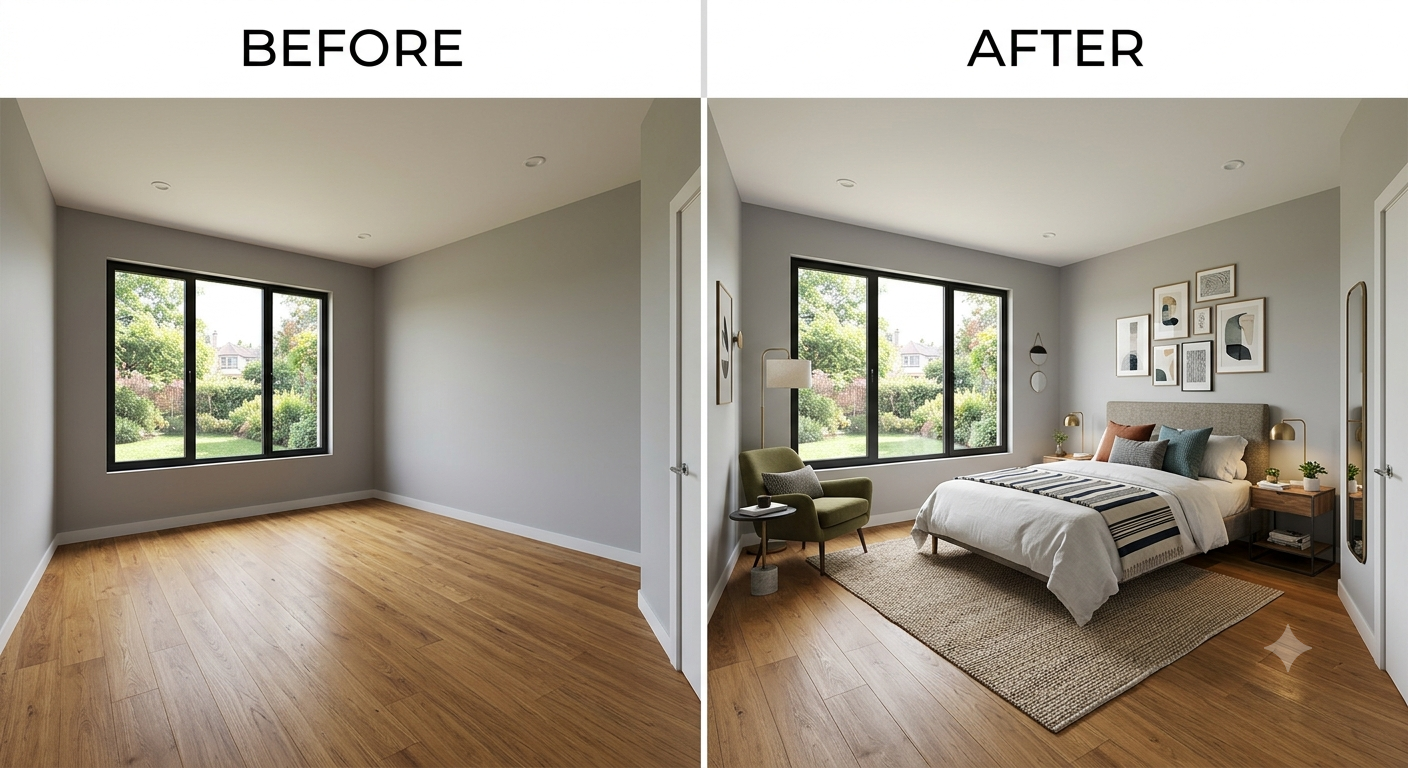
Before and after virtual staging of an empty bedroom furnished with a bed, gallery wall, accent chair, and nightstands.
Corner bedrooms with big windows are a selling point, but empty, they can feel oddly proportioned, since there's nothing to compare the wall or window size against.
Staging fixes the proportion issue immediately. The bed anchors the far wall, the gallery of frames fills the vertical space above it, and the accent chair by the window turns an unused corner into a reading nook. The result reads as considered, not just "furniture added."
Buyer reaction pattern: primary and secondary bedrooms are where buyers linger longest in listing photos; staging here directly affects time-on-listing, one of the more measurable buyer reaction signals to staged photos that agents track.
Bedroom 2: Small Styling Choices, Big Emotional Shift
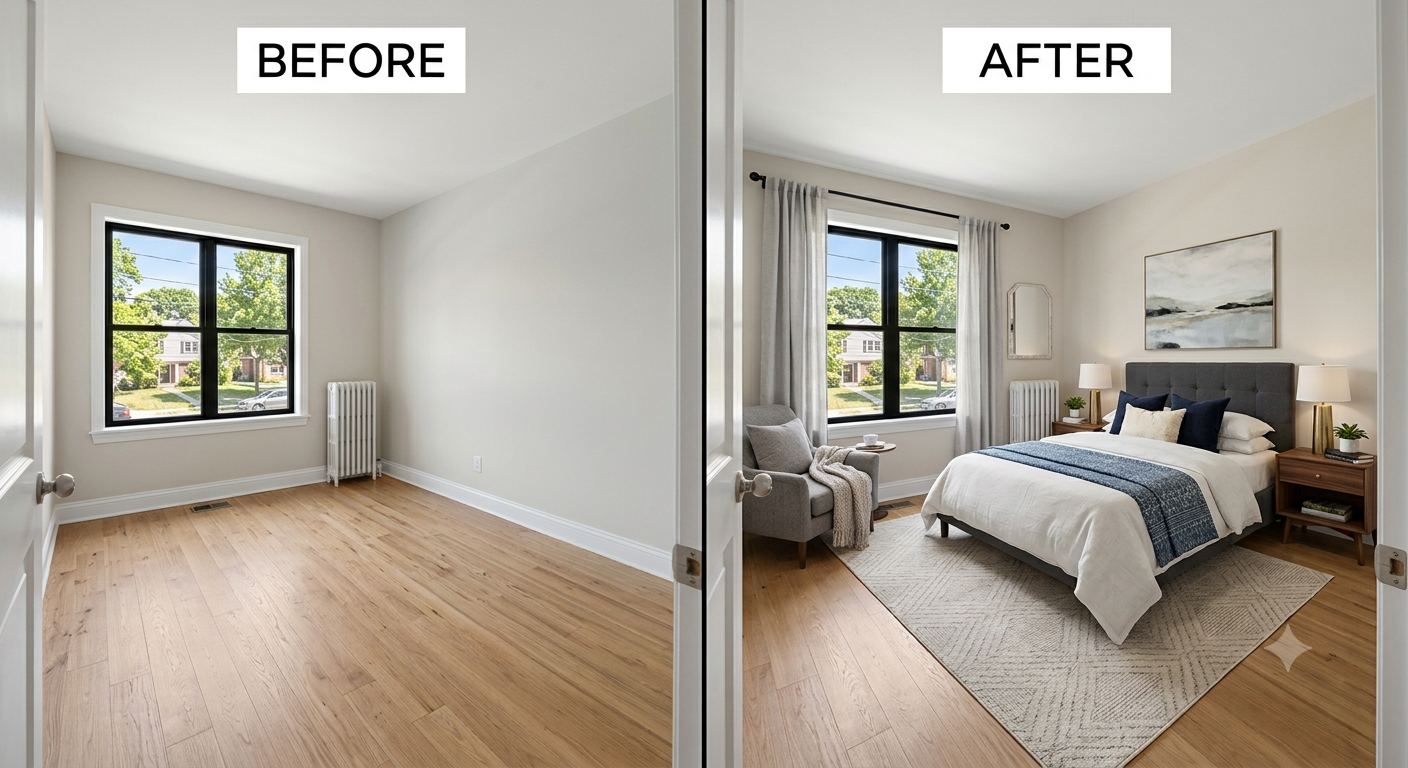
Before and after virtual staging of a second empty bedroom furnished with a bed, nightstands, chair, and window curtains.
This room shows how much a few well-placed elements can do. The empty version is plain but pleasant: decent light, an old radiator as a minor quirk, nothing offensive. The staged version doesn't overcorrect with heavy furniture; it adds a bed, two nightstands, a reading chair, and curtains, and that's essentially it.
The curtains are worth calling out specifically, a small addition that makes an outsized difference, softening the window and making the room feel finished rather than half-decorated.
This is a good reminder that virtual staging examples don't need to be dramatic to work. Restraint often reads as more believable to buyers than a heavily furnished, magazine-perfect room.
Staged vs. Unstaged: What the Pattern Tells Us
Across all five rooms, the same shifts show up every time:
None of these staging transformation photos changed the home itself, the walls, windows, and floors are identical in every before and after pair. What changed is how quickly and how positively a buyer's brain processes the room.
How AutoReel Makes Virtual Staging Effortless
Getting these results doesn't require a warehouse of furniture or a professional stager on-site. AutoReel, the #1 AI real estate video tool, includes AI Virtual Staging that furnishes empty rooms directly from listing photos, and it is included with every plan.
For agents and photographers already using AutoReel to turn listing photos into property videos, virtual staging is just one more step in the same workflow; no separate software, no waiting on a third-party rendering service.
- Upload the empty-room photo.
- Apply staging.
- The same image is ready to drop into a listing or feed straight into an AutoReel property video.
That matters because video is doing a lot of the heavy lifting in today's listings: AutoReel's platform data shows listings with video see 403% more inquiries, and the AI Photo Edits and Virtual Staging tools plug directly into that pipeline, so a staged photo isn't just a better still image, it's a stronger opening shot in a listing video too.
A few reasons agents, photographers, and media companies use AutoReel for this rather than staging every room manually:
- AI Virtual Staging furnishes empty rooms in minutes, directly from existing listing photos, free and unlimited during the current beta.
- It sits alongside AI Photo Edits (twilight conversions, lawn touch-ups) and Photo-to-Video, so staged photos can flow straight into a full property video.
- The platform has produced 225,000+ videos and holds a 4.9-star average from 370+ reviews, so it's built for real listing workflows, not a one-off design tool.
- One-Click Import from Realtor.com pulls listing photos in directly, which speeds up the whole photo-to-staged-to-video process.
The Takeaway
Buyers don't need to be told a home is move-in ready, they need to see it. Virtual staging closes the gap between an empty room's potential and a buyer's imagination, and the before/after comparisons above show exactly where that gap gets closed: in scale, in purpose, and in the emotional read of a space.
If you're deciding whether to stage a listing, the honest answer is this: unstaged photos aren't wrong, they're just asking more of the buyer than most buyers are willing to give in a five-second scroll.
Frequently Asked Questions
Does virtual staging actually change how buyers behave, or is it just a nicer-looking photo?
It changes behavior. Staged photos remove the guesswork buyers otherwise have to do around scale, room purpose, and mood, which is why they tend to hold attention longer and get more engagement than the same room shown empty.
Do virtually staged photos need to be disclosed to buyers?
Most MLSs and listing platforms require a visible disclosure, such as "virtually staged" watermarked directly on the image, so buyers know the furniture isn't included in the sale. Check your local MLS rules, since disclosure requirements vary by market.
How long does it take to virtually stage a room compared to traditional staging?
Traditional staging can take days to schedule, deliver, and set up. AI virtual staging, like the tool built into AutoReel, typically furnishes an empty room photo in minutes, with no physical furniture or in-person staging visit involved.
Should every room in a listing be virtually staged?
Not necessarily. Empty rooms with ambiguous purpose or awkward proportions: living rooms, dining rooms, and bedrooms, see the biggest gains. Rooms that are already visually clear, like most bathrooms, benefit less.
Is virtual staging more affordable than traditional staging?
Generally, yes. Traditional staging involves renting and moving physical furniture into a property, while virtual staging works directly from existing photos. Tools like AutoReel's AI Virtual Staging are cost effective as staging is included in every plan you take, thus preventing you from taking separate subscriptions.
Can virtual staging make a room look larger or smaller than it really is?
If done well, no; good virtual staging uses furniture scaled to match the room's real dimensions, which is why it helps buyers judge proportion rather than distort it. Staging that ignores true scale can mislead buyers and should be avoided.
Sources
https://www.nar.realtor/research-and-statistics/research-reports/realtor-technology-survey