🎬 Welcome to AutoReel Studio: Your New Real Estate Video Editor (2026)

Summarize with AI


AutoReel Studio · Video Editing
To shoot real estate photos that convert seamlessly into AI video, capture them as spatial data, not standalone stills. Keep camera height fixed at 48–54 inches, use one focal length (ideally 20–24mm), overlap consecutive shots by 25–35%, and shoot in a logical walkthrough order.
Lock exposure and white balance per room, avoid heavy HDR and perspective correction, and export JPEGs at quality 85–90. AutoReel AI real estate video then needs no corrective edits.
AutoReel turns listing photos into a finished property video in about 10 minutes. Studio, its built-in editor, is included free on every plan — unlimited renders, no video credits used. This guide walks through generating a video and customising it in Studio from start to finish.
What Is AutoReel Studio?
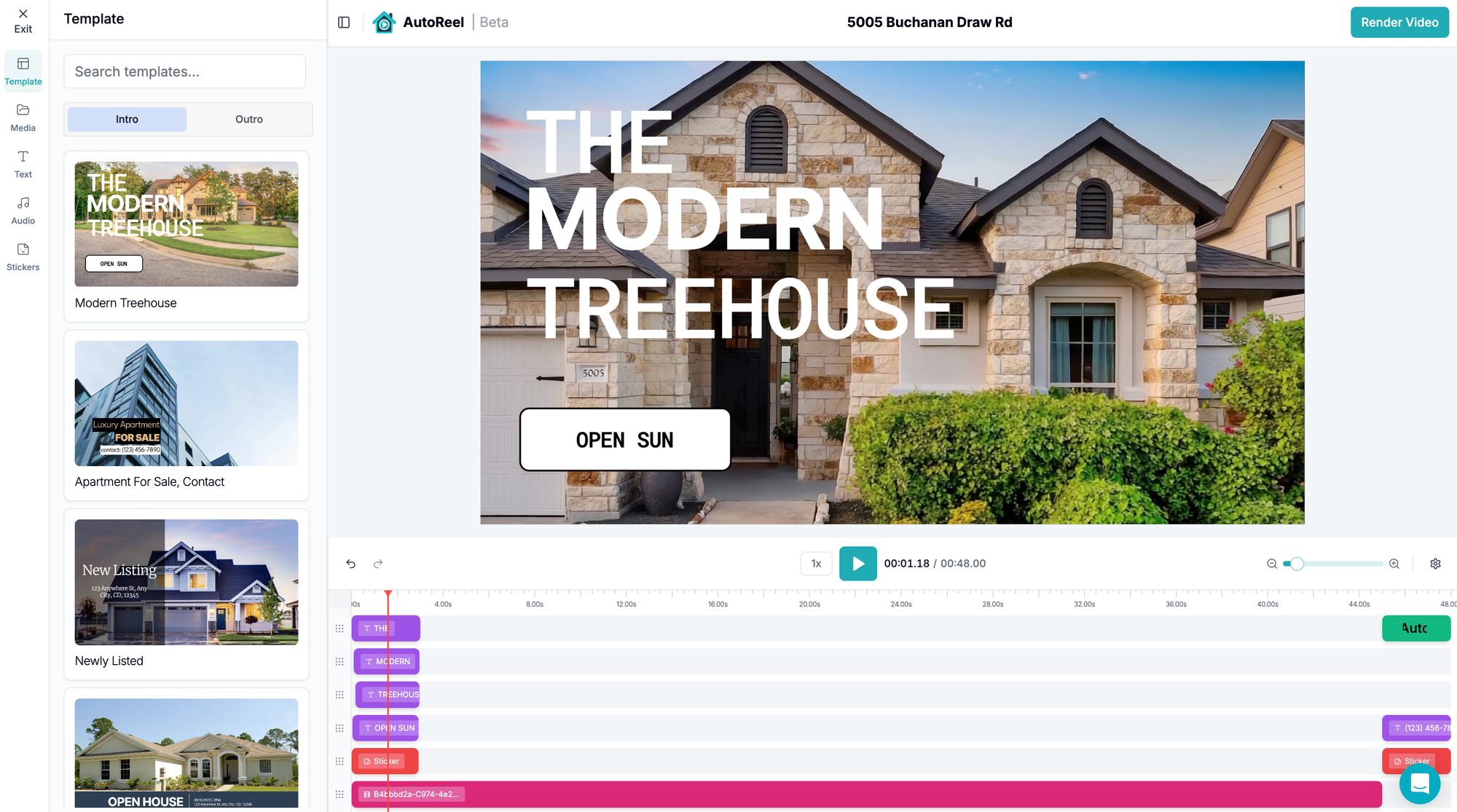
Studio is AutoReel's built-in video editor. Once a video has been generated from listing photos, Studio lets you customise every element — intros, outros, individual clips, trims, music, and on-screen text — without exporting to external software or re-uploading files.
What Studio handles inside the platform:
Over 200,000 listing videos have been generated and edited through AutoReel. Studio keeps the entire workflow — generation and editing — in one place, eliminating the export-and-reupload loop of a multi-app setup.
Part 1: Generate Your Listing Video
The generation step takes 10–15 minutes and requires three decisions: photos, orientation, and style. Keep the editing choices for Studio — adding an intro or outro at the generation stage is optional and can be done more precisely inside Studio after the video is ready.
Upload or import your listing photos
Upload 15–20 photos in walkthrough order, or use the one-click Realtor.com import. Order matters: exterior first, then main living areas, kitchen, bedrooms, bathrooms, and outdoor spaces. Consistent photo quality at this stage means fewer clip swaps in Studio.
Choose orientation, style, and music
Select aspect ratio (16:9 or 9:16), a visual style, and a music track. These can all be changed in Studio later, so choose the closest match and move on. Skip the intro/outro options here — they are easier to configure in Studio where you can preview them in context.
Generate
AutoReel processes the photos and returns a finished video in 10–15 minutes. While it processes, the video appears in your dashboard. When it is ready, open it in Studio to customise.
Part 2: Customise in AutoReel Studio
Studio opens from any generated video in your dashboard. The eight-step workflow below takes a generated video to a finished, branded listing video ready to distribute.
Open the video in Studio
From your dashboard, select the generated video and click Open in Studio. The timeline loads with every clip from the generated video in sequence.
Add an intro
Choose from the intro template library or upload a branded opener. Keep intros under 3 seconds — buyers are deciding in the first few frames whether to keep watching. Agent name, brokerage logo, and listing address are the three elements worth including.
Add an outro
The outro carries your call to action: agent contact details, website, and QR code if you use one. Branded outro assets can be saved and reused across all listings so you only configure this once.
Add or edit text overlays
Add on-screen text to any clip — room labels, property details, or a CTA in the final clip. Captions matter: most social video is watched without sound, so text carries the message for silent viewers.
Add or change music
Swap the track from the music library without affecting any other edit. Volume and fade are adjustable per clip.
Trim, split, or remove clips
Review each clip and cut anything that does not serve the tour — a repeated angle, a cluttered frame, or a clip that runs too long. For social versions, the strongest 15–30 seconds of a 60-second video usually perform better than the full cut.
Preview
Watch the full video before rendering. Check that the intro and outro display correctly, text is readable against the clip background, and the pacing feels right for the target platform.
Render
Render at no video-credit cost. Render both 16:9 and 9:16 versions in the same session — the 16:9 goes to email, your website, and YouTube; the 9:16 goes to Instagram Reels, TikTok, and YouTube Shorts.
Why Use an AI Generator with a Built-In Editor?
The alternative to a combined generate-and-edit platform is an export-and-reupload loop: generate in one tool, download, re-upload to an editor, make changes, export again, and reupload to the platform you are distributing from. Each handoff adds time and introduces compression artifacts from repeated re-encoding.
Studio keeps every step inside AutoReel. Edits render from the original generation, not from a re-uploaded compressed file. Media companies using the combined workflow report about a 25% reduction in editing time per listing compared to a split-tool setup.
Quick Tips for Better Studio Edits
Frequently Asked Questions
What is an AI real estate video generator?
An AI real estate video generator takes listing photos and converts them into a timed, formatted video clip sequence automatically. AutoReel handles the motion, pacing, and formatting — the output is a finished video ready to edit in Studio or distribute directly.
Is AutoReel Studio free?
Yes. Studio is included on every AutoReel plan at no extra cost. Renders inside Studio do not use video credits.
How do beginners start with Studio?
Generate a video from your listing photos first — Studio opens from any generated video in your dashboard. The timeline shows each clip in sequence. Start by adding an intro and outro, then adjust anything that needs changing before rendering.
Can I add my own music and logo?
Yes. Music can be swapped from the library inside Studio. Your logo and agent branding can be added in the intro and outro templates and saved for reuse across future listings.
Do I need video editing experience to use Studio?
No. Studio is designed for agents and photographers who are not video editors. The clip timeline, trim, and text tools are built for speed and simplicity — no timeline software experience required.
Where are Studio edits saved?
Edits are saved to your AutoReel dashboard automatically. Rendered videos are available for download from your account at any time.
Generate, then make it yours
AutoReel Studio is free on every plan. Generate a listing video in 10 minutes, customise it in Studio, and render as many times as you need — no video credits used.
Start Free →